
Restaurant clients counter
AI-powered guest counting
An AI module that counts customers seated at a table in a restaurant, cafe or any other public venue — automatically, on your own computer, with almost any camera.
Count guests at the table, automatically
 The Restaurant clients counter is a module in Xeoma based on artificial intelligence, tailored to count customers and clients seated at a table of a restaurant, cafe or other public establishment.
It works in restaurants, cafes, bars, pubs, nightclubs, malls, food courts and dining rooms — anywhere guests sit down. Count visitors at a table automatically, collect valuable marketing data and improve your business.
Licensing: Additional module. Purchased separately and activated on top of Xeoma Standard or Xeoma Pro.
Advantages
What makes it convenient

No special equipment
Runs on a regular computer with virtually any camera.

Flexible and versatile
Many reactions — including custom, programmable ones — plus integration with third-party systems.

Works in real time
No delays, and all processing stays on your own equipment.

Cost-effective
Perpetual licenses, bought for the amount of cameras you need.
How it works
From camera to table count

Build a simple chain
The simplest module chain that will work is: Universal camera → Restaurant clients counter → Preview and archive. You can add more modules and reactions, depending on your needs.
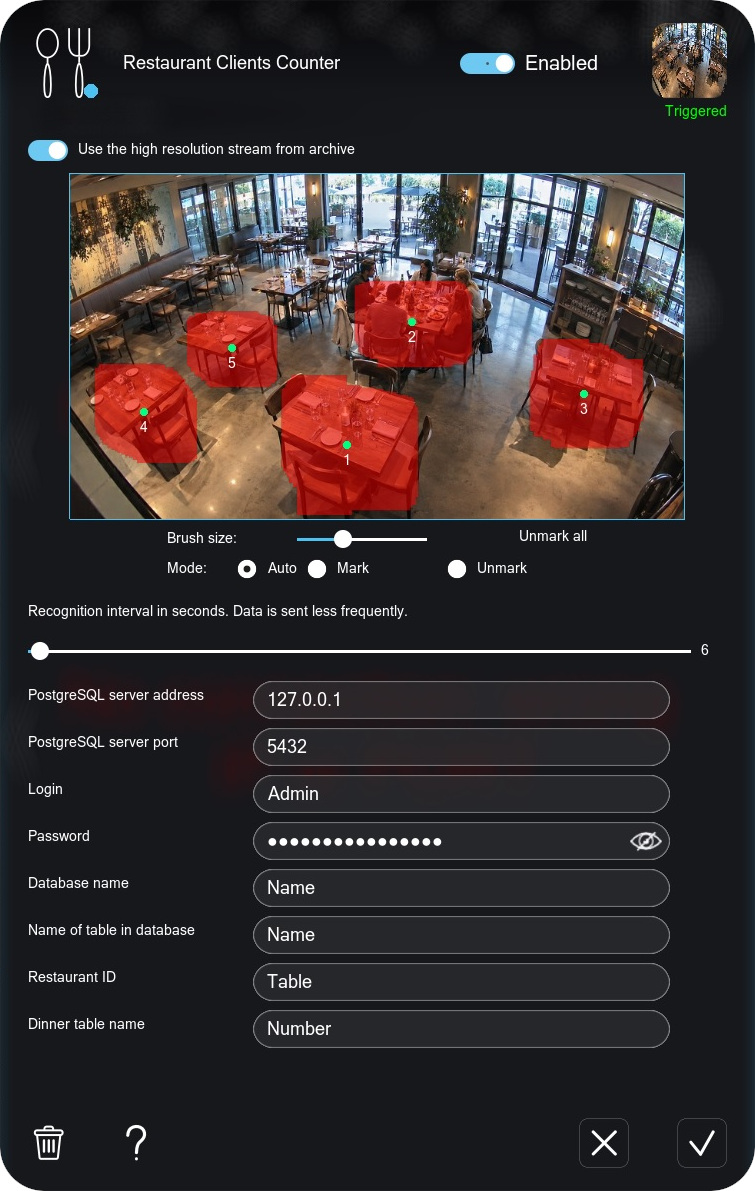
Count by table
In the module settings, mark the areas with tables — each table is a zone with its own ID, and you can add as many as the camera sees clearly.
The module then watches each table, finds and counts people with the help of AI, and transfers the data to an external PostgreSQL database configured in the settings.
Requirements
Hardware requirements
No special equipment is needed — the module runs on a regular computer with almost any camera, as long as people are clearly visible in the frame.
 A dedicated graphics card on the server is recommended for the best performance. See our hardware calculator.
Quick start
Test it in a few minutes
Download and launch Xeoma in Trial, or activate your Xeoma Standard/Pro license plus the license for the Restaurant clients counter module. You can also get a demo license for longer testing.
Let Xeoma find cameras in the network automatically, or add a camera manually by IP address. Any camera types are supported.
Place the module in the camera’s chain after the Universal Camera module.
In the module settings, select the areas with tables. Each table is a separate zone with its own ID. Point the module to the external PostgreSQL database of yours to send information to.
Recording to the archive, a CSV report, email, a sound alarm, your own custom reactions — choose the result you need from Xeoma’s arsenal.
Try Xeoma for free
Enter your email and name to get a free demo license. No credit card required.
Get free demo licenses to email
Full functionality. Sent instantly.
We urge you to refrain from using emails that contain personal data, and from sending us personal data in any other way. If you still do, by submitting this form, you confirm your consent to the processing of your personal data
Ecosystem
Works great with other Xeoma modules
Combine the Restaurant clients counter with other AI modules and reactions to get even more out of your cameras.
Unique Visitors Counter
Also counts visitors — but across the whole venue, not tied to tables. Track unique guests over the day.

Crowd Detector
Spots queues forming at the register — especially handy for cafés and fast-service spots.

Emotions Recognition
Read the mood of your guests to measure service quality and the impact of your offers.

Live Streaming
Stream live from the kitchen as a draw for guests and to build trust through transparent processes.

Sound Events Detector
Adds perimeter security — react to sounds such as breaking glass at the storefront window.

Motion Detector
Guards the perimeter during closing hours by reacting to any movement on the premises.

Fire Detection
Automated spotting of flame and smoke with an instant reaction — vital safety for busy venues.

AI Observer
A universal detector that finds almost anything in the frame from your own text description.
And that’s just a part — see the full list of Xeoma’s video analytics tools.

Need something else?
We can develop the functionality you need and add it into Xeoma as paid development. See details →
Ready to try Xeoma?
Download Xeoma and run it in Trial, or test it with a free demo license — and start counting your guests automatically.
Latest update: October 27, 2026