
Time & Attendance
Automatic work-time tracking built right into your video surveillance — from clock-in to clock-out, by face, with no terminals and no access cards.

What it is
 A time clock inside your cameras
The Time and Attendance module in Xeoma automatically tracks employees’ arrival and departure times, monitors their presence at their workstations through the day, and notes late arrivals and other schedule deviations.
The module is built on face recognition: cameras connected to the system detect an employee in the frame, the software matches the face against a database, and logs the event.
Licensing: Additional module. Purchased extra and activated over Xeoma Standard or Xeoma Pro. Requires Face Recognition.
Use cases
Where it fits best
Especially useful for organizations with large staffs and strict discipline requirements. The module turns your video surveillance into a powerful HR tool: it simplifies record-keeping, improves discipline, and cuts administrative workload.
Production workshops
Track shift start and end right on the floor.
Corporate offices
Attendance across many employees at once.
Warehouses & logistics
Presence in zones and at the gates.
Factories & plants
Discipline on strict production schedules.
Retail chains
Staff hours across many locations.
Government agencies
Objective, auditable attendance records.
Advantages
Why it beats paper logs and cards
- Eliminates human error. Automation removes the mistakes of manual timesheets and lowers administrative costs.
- Easy to deploy. It needs only a regular camera — no face-recognition terminal or other special equipment.
- Transparent accounting. Unlike paper logs or access cards, data is recorded automatically and accurately, making it much harder to manipulate — for example, with padded hours or buddy punching.
- Better discipline. When employees know their attendance is being tracked, late arrivals and early departures tend to drop.
- Performance insight. The collected data helps spot workflow inefficiencies — for example, frequent absences during certain hours.
Highlights
What makes it convenient
No special equipment
Runs on a regular computer with virtually any camera.

Flexible and versatile
Many reactions — including custom, programmable ones — plus integration with third-party systems.

Works in real time
No delays, and all processing stays on your own equipment.

Cost-effective
Perpetual licenses, bought for the number of employees you need.
How it works
From clock-in to report, automatically
Configure everything right in the interface. The time-tracking process breaks down into a few clear stages.
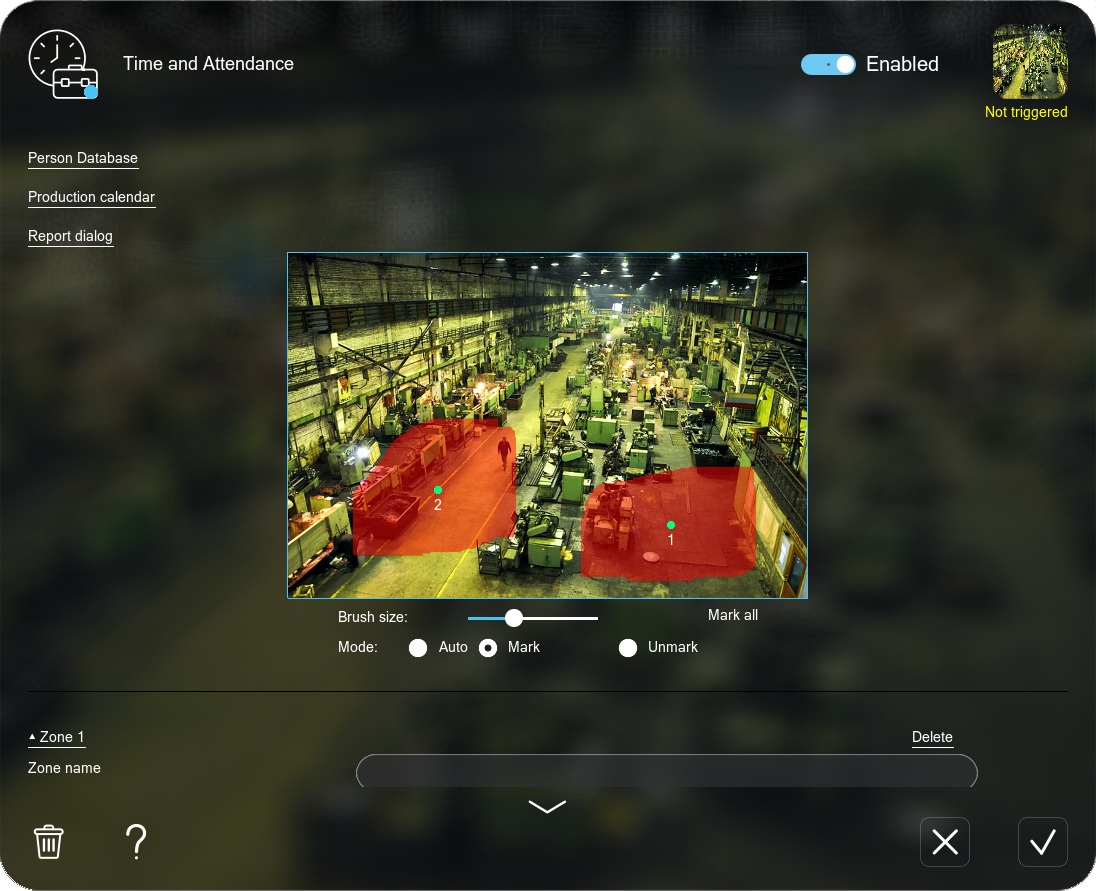
First, train the Face Recognition module and add your employees (setup instructions here). Then, in the Time and Attendance settings, define and name zones (workstation, entrance door, and so on), add employees and combine them into groups, and set the work schedule (production calendar).
When an employee enters the camera’s field of view, the system analyzes the frame and looks for a match in the database.
Once the identity is confirmed, the current time is logged as an arrival, a departure, or presence in the selected zone — depending on your settings. The data is saved to a log file.
From the collected data, the module automatically generates reports in .html — timesheets, late-arrival records and more — with detailed data for each employee. Reports cover late arrivals, time spent in zones, restricted-area access, early departures and more.
If needed, the system can alert the administrator when someone is late, leaves early, or is absent longer than allowed — through any of Xeoma’s notification modules.
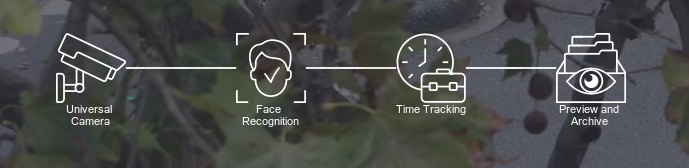
A typical chain looks like this: “Universal Camera” – “Face Recognition” – “Time and Attendance” – “Preview and Archive”.
Video guide
How to set up the Time and Attendance module
Try Xeoma for free
Enter your name and email to get a free demo license. No credit card required.
Get Xeoma free demo licenses to email
Full functionality. Sent instantly.
We urge you to refrain from using emails that contain personal data, and from sending us personal data in any other way. If you still do, by submitting this form, you confirm your consent to the processing of your personal data
Ecosystem
Related Xeoma tools
Xeoma has other modules that pair well with Time and Attendance for workplace automation and related tasks.

Face ID
Dual authentication and automated access control by face.
Visitor Counting
Counts people by line crossing or direction (entry / exit).

Search by photo
Quickly locates a specific person in recorded footage.

Crowd Detector
Detects crowds in the frame and sends notifications.
And that’s just a part of it — see all of Xeoma’s video analytics.

Need something else?
We can develop the functionality you need and add it into Xeoma as paid development. See details →
Ready to try Xeoma?
Download Xeoma and run it in Trial mode, or test it with a free demo license — no strings attached. Turn your cameras into an automated attendance system.
April 27, 2026