
A system that can see and hear
 The Sound Events Detector is a module in Xeoma based on artificial intelligence and deep machine learning. It recognizes 5 types of sound events: glass breaks, alarms, baby cries, screams, and gunshots.
Now your camera system can not only see things — it can hear events too. Combined with other Xeoma reactions and detectors, it becomes a powerful automation tool for private and corporate life.
Licensing: an Additional module. Purchased separately and activated on top of Xeoma Standard or Xeoma Pro.
What it recognizes
Five sounds, one module
Xeoma’s AI keeps listening to the camera stream for noises of a certain type, based on characteristics typical for that sound. From glass shattered by burglars to a baby’s cry or a car alarm in a parking lot — Xeoma hears it and reacts the instant it happens.

Breaking glass
In many boutiques, shop windows allow quicker access inside than doors — and the same goes for offices and private property. Catch an intrusion by the sound of breaking glass, even before the cameras see any intruders.

Gunshots
Extremely useful for police in safe-city programs. Have city cameras not just record 24/7 footage but also recognize shots fired in the streets. The pre-record feature helps unravel events from before the weapon was engaged.

Car alarm
Recognition of a car alarm sound is useful in city-safety systems, in businesses with paid parking lots, and even in long-range private residences.

Screams
A full range of screams across all genders is recognized and triggers a preset reaction instantly. Perfect for city surveillance, so a victim of an attack — or the attacker — is heard even when out of plain sight.
In banks, a scream can serve as an early indicator of a robbery; and in retail, hospitality and other customer-facing businesses, it can flag conflicts and escalations — a valuable signal for both security and service-quality monitoring.

Baby cry
Unlike regular baby monitors that only transmit video as is, Xeoma’s smart recognition of a baby’s cry sends you a notification you will actually notice — the moment your baby wakes up and needs attention.
Typical uses
Where it fits best
Xeoma’s Sound Events Detector fits almost any environment — private homes, shops and offices, banks, public spaces, and large industrial or guarded sites alike. In each of them, it listens for the sounds that matter most there.
Advantages
Why Xeoma’s sound recognition is better
Saves bandwidth
All processing runs on your own machine — no connection to cloud servers and no bandwidth wasted.
Real-time video
Works with live video streams, which means no delays as compared to sending images to cloud for processing.
Cost-effective
A one-time payment, with no per-image or per-event fees to worry about.
No special server
Recognition adds on average about 20% more load than a regular camera — an ordinary off-the-shelf computer can handle the load.
No special cameras required
Recognition runs on Xeoma’s side, so no specialized camera is needed — any source with clear audio works best indoors, near the sound. Need more? Just add a separate microphone.
Five sounds in one pack
Glass break, alarm, baby cry, screams and gunshots — all in a single affordable module.
Ease of use
Set up in a few clicks
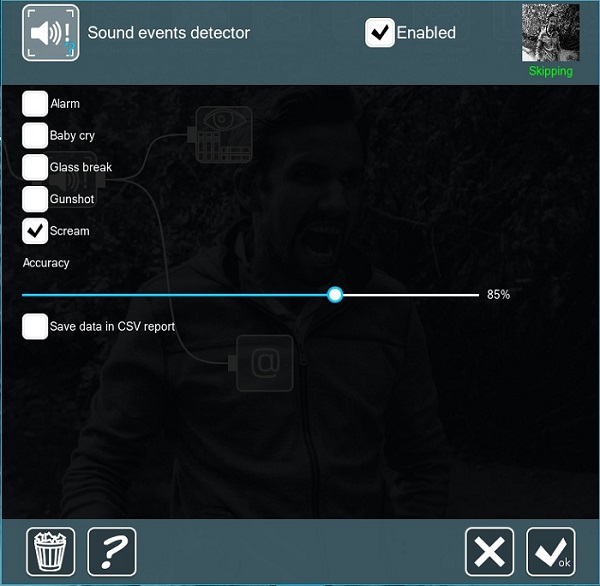
Simple interface, fully automated work and high-speed processing. Just add the Sound Events Detector module into the chain, pick which sound types the system should listen for and the acceptable accuracy level — and the module is ready for work.
Then add any reactions after it in the chain: a pop-up window, email or SMS, an HTTP command, or turning a PTZ camera toward the sound.
Build your own reports
The module can save reports as CSV spreadsheets — tick the option in its settings. Import them into Excel, LibreOffice or a database to build reports and graphs of any complexity, or automate reporting with a short script.
Requirements
Minimum hardware requirements
No special equipment or standalone server is needed — a regular computer and almost any camera with a microphone will do. The module runs on 64-bit Windows, Linux and macOS. Use our hardware calculator.
 Availability. This module works only in Xeoma for 64-bit Windows, Linux and macOS. It is not available for Linux/ARM. Contact us if you need it for an unsupported OS.
Quick start
Test it in a couple of minutes
Download and run Xeoma in Trial, or activate a Standard or Pro license plus the Sound Events Detector module. You can also get a demo license for longer testing.
Let Xeoma find cameras on the network automatically, or add one by IP. The camera needs an audio stream (a microphone).
Place the module in the camera’s chain after the Universal Camera module.
Open the module settings, choose which of the five sounds to listen for and the acceptable recognition accuracy.
Pop-up, email, SMS, sound alert, HTTP command, PTZ preset or a CSV report — pick the result you need from Xeoma’s toolkit.
Try Xeoma for free
Enter your email and name to get a free demo license. No credit card required.
Get free demo licenses to email
Full functionality. Sent instantly.
We urge you to refrain from using emails that contain personal data, and from sending us personal data in any other way. If you still do, by submitting this form, you confirm your consent to the processing of your personal data
Video
Watch it in action
Ecosystem
Works great with other Xeoma modules
Thanks to Xeoma’s flexible modular system, the Sound Events Detector pairs with notifications, automation and other detectors — and over 40 other filters are available.
Sound Detector
A companion module that reacts to the volume of sound rather than specific sound types.

Emotions Recognition
Anticipate acts of aggression from mood and behaviour — a strong pair for safe-city setups.

Move to PTZ Preset
Automatically turn an overview PTZ camera toward the area where the sound was detected.

HTTP Request Sender
Trigger external tools, scripts or automation systems the moment a sound is detected.
And that’s just a part of it — see all of Xeoma’s Additional modules.

Need something else?
We can develop the functionality you need and add it into Xeoma as paid development. See details →
Ready to try Xeoma?
Download Xeoma and run it in Trial, or test it with a free demo license — and give your cameras the power to hear.
Latest update: October 26, 2026