
Face ID
Two-factor authentication for strict access control
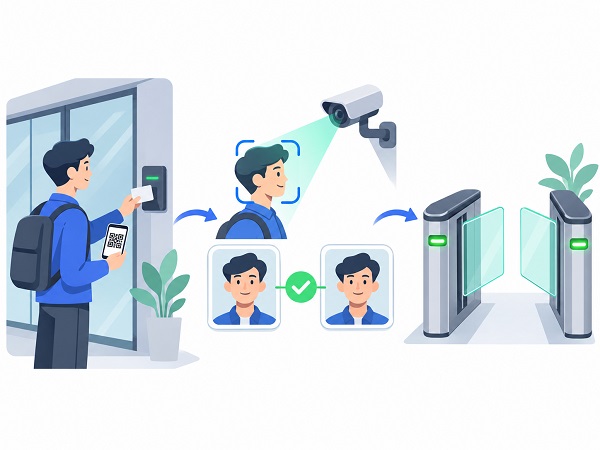
The module verifies identity by matching the face in the frame to a corresponding photo stored in a database, which is linked to the person’s access card or QR code.
The face as a second factor of access
 The Face ID Additional module in Xeoma adds a layer of security to access control by using two-factor authentication. It detects a face in the frame and compares it to a photo stored in the user’s profile.
Working in conjunction with the Smart Card Reader or QR Code Recognition modules, Face ID receives user identification data, retrieves the corresponding photo, and verifies identity through facial comparison – ensuring only authorized individuals gain access.
Licensing: Additional module. Purchased separately and activated on top of Xeoma Standard or Xeoma Pro. A one-hour trial period and demo licenses are available.
How it works
A card or QR code, plus the face
At the checkpoint, a person presents their access card or QR code. The reader retrieves the associated profile information and sends it to the Face ID module.
Face ID then detects the face in the frame and compares it to the photo linked to that profile. A successful match triggers the configured reactions; mismatches can be handled with separate, custom reactions.
Advantages
Why people choose Face ID by Xeoma
Two-factor authentication
Access requires both a valid pass and a matching face – a robust safeguard against unauthorized access even if the pass is lost or stolen.
No special equipment
Works with standard computers and cameras – no need for expensive, dedicated hardware or specialized facial recognition terminals.
Local or LDAP database
For maximum flexibility, photos can be sourced from a local image folder on the server or directly from an LDAP database.
In real time
Local processing: facial recognition runs entirely on your hardware, ensuring privacy and eliminating delays.
Flexible reactions
A wide range of automated and customizable responses – from opening doors and sending alerts to recording events and raising alarms.
Reports and face search
Benefit from detailed event logging to CSV and log files, snapshots of identified faces, and continuous recognition for efficient archive searching.
Where it fits
Where Face ID is used
For any environment that demands strict control and reliable identity verification. Common applications include:

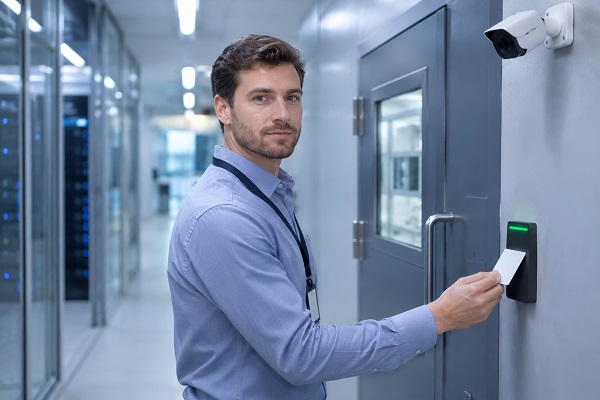
Access control at facilities
- Checkpoints at enterprises, plants and factories
- Educational institutions (universities, schools)
- Fitness centers and clubs
- Government and financial institutions (banks, police, courts)
- Residential properties and homes
- Restricted areas in airports
High-security environments
- Prisons and military bases
- Laboratories with hazardous materials
- Medical facilities requiring secure drug access
- Any location demanding strict identity verification
Quick start
Test it in a couple of minutes
Download and run Xeoma in the Trial edition, or activate a Standard or Pro license plus a license for the Face ID module. You can also get a demo license for longer testing.
Let Xeoma find cameras in the network automatically, or add a camera manually by IP address. Any camera types are supported.
After the camera, add the Smart Card Reader or QR Code Recognition module to the chain, and the Face ID module after it.
Click the module in the chain to open its settings. Set the source of known faces (a local folder or LDAP), the recognition accuracy and other parameters to suit your case. Detailed setup instructions →
Open a door, record to the archive, send a messenger or email message, play a sound, send network commands, or your own reaction — choose the result you need from Xeoma’s arsenal.
Try Xeoma for free
Enter your email and name to get a free demo license. No credit card required.
Get free demo licenses to email
Full functionality. Sent instantly.
We urge you to refrain from using emails that contain personal data, and from sending us personal data in any other way. If you still do, by submitting this form, you confirm your consent to the processing of your personal data
Video
See Face ID in action
Ecosystem
Related Xeoma tools
You can use Face ID together with Xeoma’s other features for even more powerful results.

Smart Card Reader
This module reads access cards and forwards the cardholder’s information to the Face ID module, providing the first layer of verification.
QR Code Recognition
An alternative first layer of authentication for Face ID: it extracts the pass holder’s details from a QR code.

Face Recognition
Offers face detection and recognition capabilities for security, attendance, and analytics purposes, without the need for a physical pass.

Time and Attendance
Tracks employee arrivals and departures using facial recognition and offers a convenient integration with access control systems.
And that’s only part of it — explore all 100+ features of the Xeoma video surveillance software.
Ready to try Xeoma?
Download the free version or get a full-featured demo license, and set up Face ID in a few minutes.
Latest update: November 17, 2026