

P2P on your camera: a handy feature that can turn into a security hole
Many modern IP cameras have a P2P option in their settings. P2P stands for peer-to-peer — a technology that lets the camera and your phone connect over the internet without a static IP address or manual port forwarding.
Its appeal is simplicity: there’s no need to wrestle with technical details – just scan a QR code or type the camera’s ID into a mobile app, and you’re already watching the live feed from your phone, anywhere in the world. That’s exactly why manufacturers ship their cameras with P2P enabled out of the box and pitch it as «one-tap connection».But convenience has a flip side — and the price you pay for it is usually your security.
Why P2P on a camera is a risk
When P2P is on, the camera opens a constant outbound connection to the manufacturer’s cloud servers, without any input from you. Those servers build the bridge between the camera and your app. In other words, the feed from your camera passes through someone else’s infrastructure — one you neither control nor can observe.
This is where the main dangers come from:
You depend on someone else’s cloud security. If the manufacturer’s servers are breached, or a vulnerability is found in them, every camera connected through that system is exposed — yours included. This has actually happened before: leaked databases of camera IDs and passwords, and flaws in cloud platforms that let strangers tap into other people’s live feeds.
The P2P protocols themselves are often poorly protected. Security researchers have repeatedly found that camera IDs are predictable, traffic is weakly encrypted or not encrypted at all, and the «handshake» between camera and cloud can be intercepted. In a number of popular firmware versions, this made it possible to connect to someone else’s camera knowing just its serial number.
Factory-default and weak passwords. Many people never change the default login and password. Paired with a channel that is always open to the outside world, that turns a camera into easy prey — this is exactly how devices were infected en masse and pulled into botnets.
The outbound channel is always on. Even when you’re not watching the feed, the camera keeps talking to external servers. That’s an extra point of entry, open around the clock.
How to protect yourself and your camera
The simplest and most effective step is to keep P2P switched off if you don’t need it. Open your camera’s settings and disable P2P / «cloud access» / «remote access via cloud» — the feature goes by different names in different firmware.
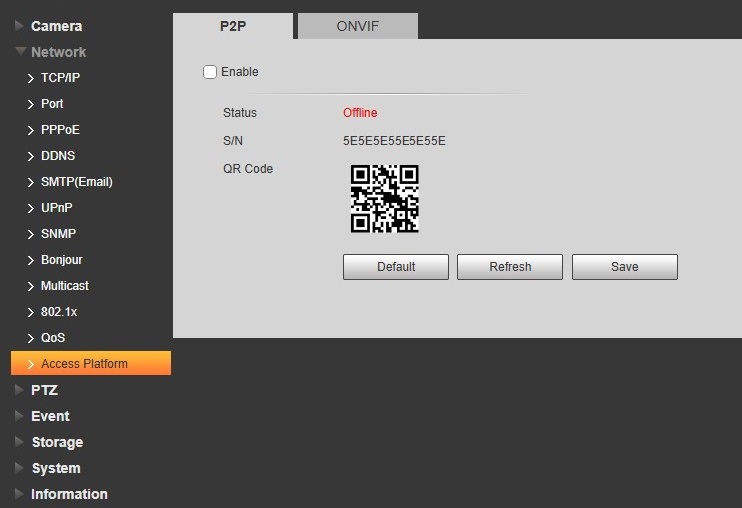
If you do need remote access to your camera, connect it to the Xeoma video surveillance software instead. Xeoma offers easy remote access too, but it’s built on a proprietary, secure connection. That connection is established only once, during the initial setup, and isn’t kept open afterward. With no permanent channel left behind, there’s nothing there for an attacker to exploit.
Don’t forget about passwords, either: be sure to replace the factory default with a long, complex one. Experts also recommend updating your camera’s firmware regularly: most known vulnerabilities are fixed through updates. That said, you shouldn’t rely on this alone: there is always a window between the moment a flaw appears and the moment the manufacturer ships a patch, and anyone can still fall victim before the update lands.
The bottom line
The camera’s P2P option often turns out to be a trade of control for convenience. For a camera watching your front door, your child’s room, or your office, that trade may fail to pay off: you save five minutes on setup, but you’re left with a permanently open channel and its security is out of your hands. If you can’t do without remote access, choose a method that keeps you in control — and in most cases, P2P is a feature you’re better off simply switching off.
October 19, 2026