
Xeoma Cloud videovalvesüsteem
Xeoma Cloud on täielikult hallatav videovalve teenuse (VSaaS) platvorm. See töötab meie infrastruktuuril – teil tuleb vaid kaamerad ühendada ja jälgimist alustada. Me haldame kõiki serveritoiminguid: töötlemist, hooldust ja uuendusi. Saate kohese juurdepääsu otseülekannetele, videoarhiividele, salvestistele ja Xeoma töölauaversiooni funktsionaalsusele – mis tahes seadmest ja igal ajal.
Kõik vajalik: kaamera ja internetühendus. See on kõik.
Xeoma Cloud võib toimida ka täiendusena teie arvutis töötavale Xeoma tarkvarale, et edastada videot pilve ning võimaldada kaugjuurdepääsu otseülekannetele ja arhiivile Xeoma kliendi või veebibrauseri kaudu.
Sisestage oma meiliaadress, et aktiveerida 24-tunnine tasuta juurdepääs kuni kahele kaamerale. Krediidikaarti ei ole vaja.
Palume vältida isikuandmeid sisaldavate e-kirjade kasutamist ja isikuandmete saatmist muul viisil. Kui siiski seda teete, kinnitate selle vormi esitamisega oma nõusoleku isikuandmete töötlemiseks
Eripakkumine: Saatke meile sõnum ja saate 7 lisapäeva tasuta Xeoma Cloudi juurdepääsu!
- Kiire käivitus
Ühendamine võtab vaid mõned minutid. Infrastruktuuri loomine või eriteadmised pole vajalikud. Järgige meie samm-sammult juhendit või videoõpetusi, et kohe tööle hakata. - Madalamad kulud, hooldusvaba
Serverite ostmine, seadistamine ja hooldamine pole vajalik. Puudub ööpäevane elektritarbimine. Meie meeskond haldab infrastruktuuri, säästes teid riistvarakuludest ja jooksvatest tegevuskuludest. - Usaldusväärne ja turvaline
Töökindel ühendus igal ajal. Salvestised hoitakse turvaliselt meie pilveserverites. Ainult volitatud kasutajad pääsevad otseülekannetele ja arhiividele. Isegi kui kaamerat füüsiliselt kahjustatakse, jäävad salvestised kaitstuks. - Põhjalik funktsionaalsus
Erinevalt lihtsatest pilvevalve teenustest, mis pakuvad vaid liikumise tuvastamist ja salvestamist, võimaldab Xeoma Cloud kasutada kaugeleulatuvaid funktsioone: e-kaarte, objektide jälgimist, POS-süsteemide integratsiooni, koduautomaatikat, sünkroonitud mitme arhiivi taasesitust ja palju muud. Soovi korral saab lisada üle 30 AI-põhise tööriista. -
Läbipaistev hinnakujundus. Peidetud tasusid pole.
Valige paindlike tellimustasemete vahel, mille tingimused on selged ja arusaadavad. Nutikad lisamoodulid on saadaval avaldatud hinnaga eksemplari kohta – te ei maksa üle tööriistade eest, mida te ei vaja. Maksate täpselt seda, mida näete. - Reklaamivaba. Vesimärgid puuduvad. Igaveseks.
Otsevaade ja salvestised on alati vabad reklaamidest ja logode pealiskatetest, sõltumata tellimustasemest, sealhulgas tasuta prooviperioodil.
Kõigesse tellimusse on kaasatud:
- Reklaamid ja logodega vesimärgid puuduvad nii otsevaates kui ka arhiivis
- Piiramatu otseühenduste ja salvestuste vaatamine
- Piiramatu videote allalaadimine
- Toetus kõikidele kaamera lahutustele
- Piiramatu kaadrisagedus (fps)
Xeoma Cloud annab juurdepääsu täiustatud videoanalüütikale isegi täielikult hallatavas pilvekeskkonnas. Ressursinõudlikud analüüsimoodulid ei kuulu standardsetesse tellimusplaanidesse, kuid neid saab soovi korral igale plaanile lisada.
Saadaval analüüsi lisamoodulid
- Põhiline automaatne numbrimärgituvastus (ANPR/LPR)
- RTSP edastamine
- Objektidetektor
- Privaatsusmaskid
- Pildi pööramine
- Pildi suuruse muutmine
- Suitsudetektor
- Põhiline näotuvastaja
- Kalasilmaläätse moonutuste korrigeerimine
Lisamoodulite hinnakiri: 20 USD megapiksli (MP) kohta, ühe kaamera eest kuus.
Võtke meiega ühendust, et lisada need moodulid oma tellimusplaani või saada individuaalne hinnapakkumine. Täieliku teabe leiate ostulehelt.
Veelgi nutikam
Eksklusiivne: lisaks tarkadele lisamoodulitele saab Xeoma Cloudi kontodega ühendada ka AI-põhiseid lisamooduleid:
- Täiustatud numbrimärkide automaatne tuvastamine (ANPR/LPR)
- Täiustatud näotuvastus
- Emotsioonituvastus
- Tekstituvastus (OCR)
- Objektide klassifitseerimine
- Unikaalsete külastajate loendur
- Libisemis- ja kukkumistuvastus
- Sootuvastus
- Rahvahulga tuvastaja
- Helisündmuste tuvastaja
- Vanuse äratundja
- Silmade liikumise jälgimine ja palju rohkem!
Lisamoodulite hinnad: 20 USD megapiksli (MP), kaamera ja kuu kohta + mooduli renditasu
Võtke meiega ühendust, et lisada need moodulid oma paketile või küsida hinnapakkumist. Vaadake üksikasju ostulehelt.
Xeoma Cloud on pilveteenus – teie kaamerad ja salvestised asuvad meie serverites. Kõige ühendamiseks ja haldamiseks vajate tasuta Xeoma Clienti rakendust. Siin on juhised, kuidas minna mõne minutiga tööle:
Laadige tasuta Xeoma Clienti rakendus allalaadimislehelt. Saadaval Windowsile, Linuxile, macOSile ja Androidile. Tasuta.
Ostke tellimus või hankige tasuta 24-tunnine prooviversioon testimiseks.
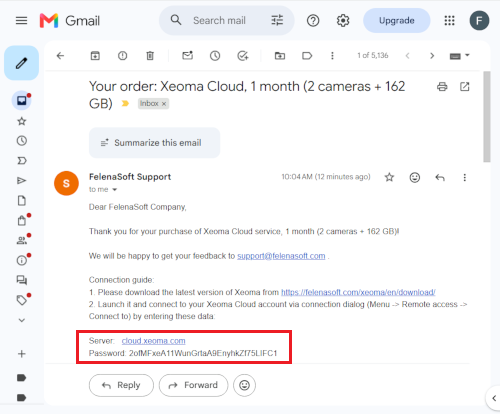
Pärast 2. sammu saate kinnitava e-kirja serveri aadressi ja sisselogimisandmetega. Hoidke see alles – vajate seda järgmises sammus.
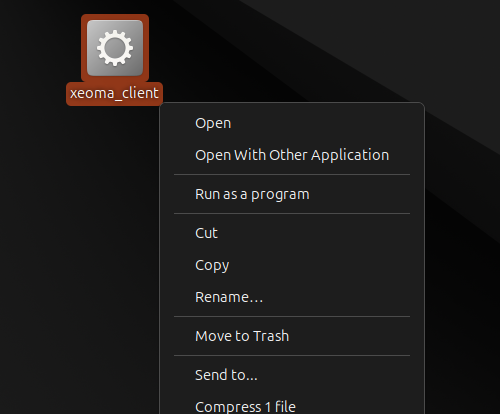
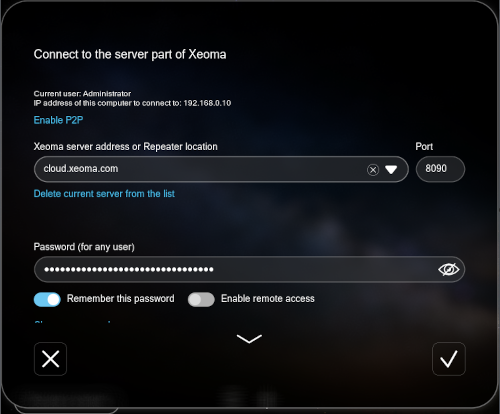
Käivitage 1. sammus allalaaditud Xeoma Client, sisestage e-kirjast saadud serveri aadress ja andmed ning oletegi sees. Seejärel ühendage oma kaamerad, et alustada jälgimist.
Kas teil on juba Xeoma Cloudi konto? Siin on juhised kaamerate lisamiseks. Kiireim viis on avaliku IP-aadressiga kaamerate puhul – kui teil sellist pole, pakume mitmeid lahendusi.
Käivitage Xeoma Client ja ühendage oma Cloudi kontoga, kasutades tervituskirjast saadud serveri aadressi ja andmeid.
Avage alumise paneeli + menüü ja valige Otsi IP/parooliga. Xeoma skaneerib võrgus olevad kaamerad automaatselt.
Teie kaamera tuvastatakse ja lisatakse automaatselt teie Cloudi kontole. Manuaalne seadistamine pole vajalik.
Kaameral puudub avalik IP-aadress? Pole probleemi – vaadake meie täielikku ühendusjuhendit FTP-üleslaadimise, VPN-i, dynDNS-i ja muude võimaluste kohta, sealhulgas USB- ja veebikaamerate jaoks.
Otsite juhendit Xeoma Cloudi kontole sisselogimiseks? Vaadake siit
| Seadmed | Filtrid | Sihtkohad |
|---|---|---|
| Universaalne kaamera (välja arvatud USB-kaamerad) | Liikumistuvastus | Eelvaade |
| Mikrofon (ainult IP-mikrofonid) | Ajastaja | Eelvaade ja arhiiv |
| Teine Xeoma | Märgistamine | E-kirja saatmine |
| FTP-vastuvõtja | Päevatuvastus | Veebiserver |
| HTTP-vastuvõtja | Pildi pööramine | Hüpikaken (kliendis) |
| Unitor | HTTP-päringute saatja | |
| Kohandatud tuvastus | FTP-üleslaadimine | |
| HTTP-lüliti | HTTP-üleslaadimine teise Xeomasse | |
| Külastajate loendur | Mobiilsed teavitused | |
| Helituvastus | Otseülekanne YouTube'i | |
| Tõrketuvastus | SMS-i saatmine | |
| HTTP-märgistamine | ||
| Reelelüliti | ||
| Tingimus | ||
| Kalasilmaläätse moonutuste korrigeerimine | ||
| PTZ-jälgimine | ||
| Pildi lõikamine | ||
| Objekti suuruse filtreerimine | ||
| Liikumine PTZ-eelseadistusele | ||
| Nupilüliti | ||
| Mahajäetud esemete tuvastus | ||
| Termokaamera andmed | ||
| SmartHome – RIF+ | ||
| Sõiduki kiiruse tuvastus | ||
| Kaamerasse integreeritud tuvastus |
Moodulid, mis ei ole Xeoma Cloudis saadaval
Järgmised moodulid ei ole Xeoma Cloudis toetatud – kas seetõttu, et need nõuavad kohalikku riistvarale juurdepääsu, või kuna need on ressursimahukad lisad (saadaval eraldi hinnaga 20 USD/MP/kuus):
| Seadmed | Filtrid | Sihtkohad |
|---|---|---|
| Ekraanilt jäädvustamine | PTZ-jälgimine Senstar/Flexzone eelseadistustega | Salvesta faili |
| Faili lugemine | Külastajate loendur* | Helisignaal serveris |
| Objektide tuvastus* | RTSP-edastus* | |
| Pildi mõõtmete muutmine* | Rakenduse käivitaja | |
| Pikaajalise viibimise tuvastus | ANPR-andmete FTP-üleslaadimine* | |
| Näotuvastus* | Kiiruse tuvastus (saatja) | |
| Numbrimärkide tuvastus (ANPR)* | ||
| Jooneületuse tuvastus | ||
| Suitsutuvastus* | ||
| Mahajäetud esemete tuvastus | ||
| Kaamerasse integreeritud tuvastus | ||
| GPIO | ||
| Privaatsusmaskimine* |
| Xeoma Cloud tellimus | Keskmine salvestusaeg* (liikumispõhine salvestamine) | Keskmine salvestusaeg* (pidev salvestamine) | Samaaegsed vaatajad |
|---|---|---|---|
| 1 kaamera + 0,5 GB ruumi | ~22 tundi | ~1 tund | 1 |
| 1 kaamera + 1 GB ruumi | ~44 tundi | ~2 tundi | 1 |
| 1 kaamera + 81 GB ruumi | ~150 päeva | ~7 päeva 12 tundi | 1 |
| kuni 2 kaamerat + 162 GB ruumi | ~150 päeva | ~7 päeva 12 tundi | 2 |
| kuni 4 kaamerat + 324 GB ruumi | ~150 päeva | ~7 päeva 12 tundi | 4 |
| kuni 8 kaamerat + 648 GB ruumi | ~150 päeva | ~7 päeva 12 tundi | 8 |
| kuni 16 kaamerat + 1296 GB ruumi | ~150 päeva | ~7 päeva 12 tundi | 16 |
| kuni 32 kaamerat + 2592 GB ruumi | ~150 päeva | ~7 päeva 12 tundi | 32 |
| kuni 64 kaamerat + 5184 GB ruumi | ~150 päeva | ~7 päeva 12 tundi | 64 |
| kuni 128 kaamerat + 10368 GB ruumi | ~150 päeva | ~7 päeva 12 tundi | 128 |
 Andmete säilitusajad on hinnangulised, põhinedes 1 MP (1080×720) H.264-kaamerale sagedusega 25 p/s ja bitikiirusega 1 Mbit/s. Tegelik säilitusaeg võib erineda. Täpsema hinnangu saamiseks kasutage veebikalkulaatorit.
*Kui salvestusmaht saab täis, kirjutab tsükliline salvestamine vanima salvestise automaatselt uuema üle.
Paljud pilvevalve teenusepakkujad reklaamivad madalaid algseid hindu, kuid küsivad põhifunktsioonide, nagu vesimärgi eemaldamine või kõrgem resolutsioon, eest lisatasu. Xeoma Cloud sisaldab kõike juba vaikimisi, ilma funktsioonipõhiste lisatasude ja kaamera resolutsiooni piiranguteta.
| Funktsioon | Xeoma Cloud | Tüüpilised pilvteenused |
|---|---|---|
| Reklaamivaba |  |
 |
| Vesimärgid puuduvad | |
|
| Piiramatu otsevaatamine ja arhiivi vaatamine |
|
|
| Piiranguteta videode allalaadimine | |
|
| Suvaline kaamera lahutusvõime | |
|
| Suvaline kaadrisagedus (fps) | |
|
| Saadaval on täiustatud funktsioonid | |
|
| Paindlikud tellimusvalikud | |
|
| Läbipaistev hinnastus, ilma lisatasudeta | |
|
| Pidev või liikumisel aktiveeruv salvestamine | |
|
Kaamera nõuded
- Toetatud koodekid: JPEG, MJPEG, H.264, H.265, MPEG-4
- Võrguühendus: kaameral peab olema avalik IP-aadress (eelistatavalt staatiline või dünaamiline DDNS-i kaudu)
- Portide edastamine on nõutav: port 80 JPEG/MJPEG jaoks; port 554 H.264/H.265/MPEG-4 jaoks
- Staatiline IP-aadress puudub? Kasutage meie ühendusjuhendis loetletud lahendusi.
Eelvaatevoogude piirangud
- Maksimaalne lahutusvõime H.264/H.265/MPEG-4 voogude puhul: 352×288
- Maksimaalne bitikiirus H.264/H.265/MPEG-4 voogude puhul: 150 Kbps
- MJPEG/JPEG voogudel ei ole piiranguid
- Soovitus: kasutage eelvaateks ja otseseks arhiivisalvestuseks JPEG-i või MJPEG-i
Võrgu nõuded
Ribalaius sõltub kaamera lahutusvõimest ja kaadrisagedusest. Soovitatav on piiramatu andmeliiklusega internetiühendus.
Sobivaimad kasutusjuhud
Xeoma Cloud sobib suurepäraselt nii üksikute kui ka mitme asukohaga lahendusteks: jaepoodidesse, parklatesse, koolidesse, ladudesse ja kõikjale, kus kohapealse serveri haldamine on ebamugav.
Pilv vs kohapealne lahendus: peamised eelised
- Välistab serveririistvara ja IT-taristu kulud
- Puudub serveri 24/7 energiatarve
- Ideaalne mitme asukohaga lahendustele
- Salvestised hoitakse väljaspool objekti – need on kaitstud füüsilise varguse ja vandalismi eest
- Hoolduskoormus puudub – haldamisega tegeleb täielikult meie meeskond
Vajate pilvlahendust oma serveris? Kasutage täielikuks infrastruktuuri kontrolliks Xeoma Pro Your Cloud.
Müüge Xeoma Cloudi
Liituge meie edasimüügi programmiga ja teenige tulu iga müüdud Xeoma Cloudi tellimuselt. Eeliste hulka kuuluvad turuliidri marginaalid, personaalne partneritugi, white-label (OEM/ümberbrändimine) võimalused ja abi kaasamüügil.
Millised on Xeoma Cloudi riistvaranõudmused?
Puuduvad. Te ei pea ostma ega hooldama ühtegi serveririistvara. Vaja on vaid internetiühendust ja kaameraid.
Milliseid kaameraid toetatakse?
Xeoma Cloud toetab praktiliselt kõiki IP-kaameraid. Kui teie mudel puudub toetatud kaamerate loendist, taotlege ühilduvuse kontrollimiseks tasuta prooviversioon. Loendis olevate mudelite töö on garanteeritud.
Kas pean installima tarkvara?
Paigaldamine pole vajalik. Xeoma Cloud töötab meie serverites. Ühenduse saate luua Xeoma Cliendi (portatiivne, paigaldamist ei vaja) või otse veebibrauseri kaudu.
Kuidas uuendada tellimust lepinguperioodi jooksul? (nt on kasutuses 14 kaamerat, kuid vaja on 18)
Teil on kaks võimalust: oodake praeguse tellimuse lõppemist ja ostke uus pakett või võtke meiega ühendust ning arvutame täienduskulu proportsionaalselt – isegi kui tellimus pole veel lõppenud.
Kuidas jälgida allesjäänud salvestusruumi või tellimuspäevi?
Tellimuste paneelil näete allesjäänud salvestusruumi ja päevade arvu ühe pilguga. Vajaduste kasvades saate paketti igal ajal laiendada.
