
Eye Tracking
A neural-network-powered module that detects where a person in the frame is looking — in real time, with no special equipment or sensors.
The gaze as a source of data
 Eye Tracking is a neural-network-based Additional module in Xeoma that lets your video surveillance system follow where a person is looking. It needs no special equipment or sensors.
The data it produces lets you gather statistics for a wide range of purposes — from marketing to science and security.
Licensing: Additional module. Purchased separately and activated on top of Xeoma Standard or Xeoma Pro.
Use cases
Where eye tracking is used
Automatic eye tracking is one of the most effective ways to gather cognitive data in seconds. It fits anywhere studying human behavior matters.

Marketing research
Understand customer behavior: where the gaze travels, what grabs attention and which product placement works best.
Find out whether a new product, banner or promo stand catches the eye. It can work alongside other video analytics — for example, age, gender and emotion recognition.
Perfect for supermarkets, shopping malls, warehouses and other businesses.
Entertainment and art
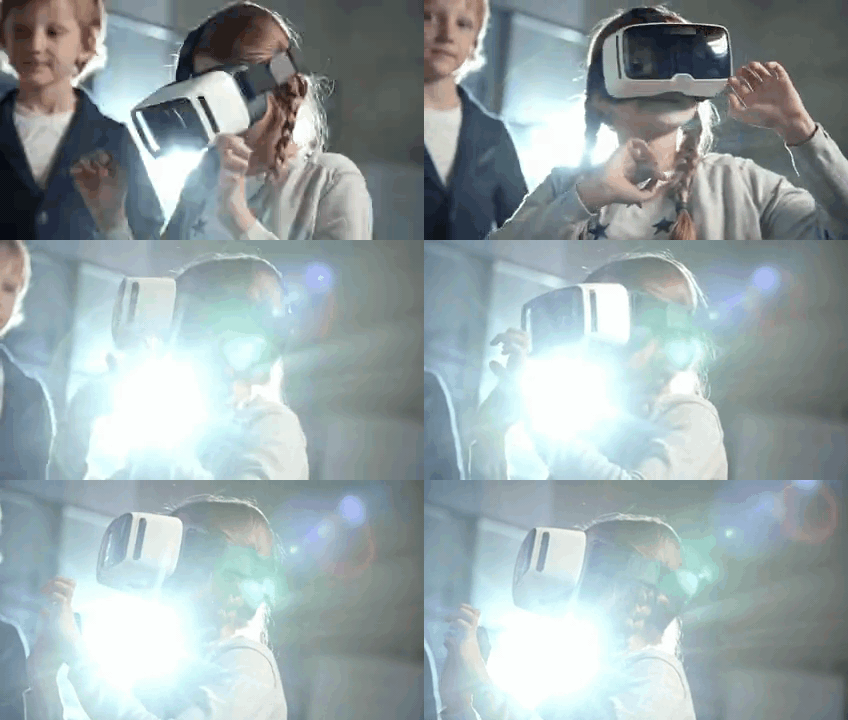
Entertainment, art, virtual reality and gaming reach a new level: Xeoma tracks the pupil’s path and creates a fully immersive effect.
Create works of art with a glance, or use the module’s data as a source of inspiration. Integration with third-party devices is possible.
Useful for artists and creative professionals, game developers and anyone who wants a taste of the future.

Study and research
Eye tracking is used by scientists, professors and students. Xeoma puts it within reach of a far wider audience — run experiments with nothing but a camera.
Explore the psychology of the gaze with colleagues or students. A hands-on example makes learning exciting and motivating.
Perfect for schools and universities, research centers and personal use.

Security
Doors that open when you look into the camera are no longer the stuff of movies. With the Eye tracking module you can trigger an action automatically — for example, open a door hands-free — when a gaze is detected toward a specific zone.
The module can also work together with Face recognition for stronger security.
Suitable for any business, homes, government buildings, banks, construction firms, prisons and more — especially where hands are often busy.
Neuromarketing
Advertising that hits the mark
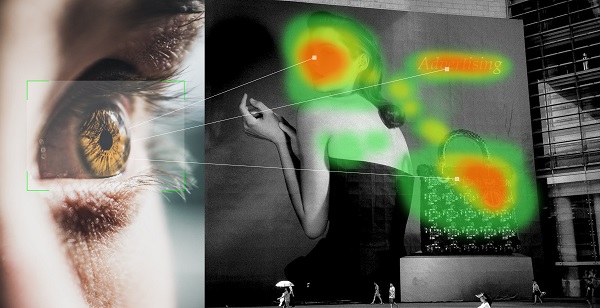
Neuromarketing is a new field of marketing that uses technologies like eye tracking to study how people react to ad campaigns and to learn about the preferences and decisions of potential customers.
Test an ad campaign on a focus group and pinpoint exactly where they look — so you know whether their attention lands on the right part of the ad.
Xeoma’s AI reveals more than the human eye can catch. Gather marketing data and craft the perfect ad that hits home at once.
Advantages
Why choose eye tracking in Xeoma
No special equipment
Runs on an ordinary computer with virtually any cameras. No dedicated server or sensor-equipped cameras required — all that matters is a clear image.
Simple and flexible
Easy to set up and works together with other modules, devices and sensors. Reactions are tailored to your task.
In real time
Processes the video stream without delays, around the clock — statistics are collected continuously, with no fatigue or breaks.
Local processing
Analytics run on your own equipment, with no data sent to the cloud. Privacy is a core principle of Xeoma.
Reports and integrations
Saves reports of triggers and sends SMS, email or HTTP commands to external services and systems.
Cost-effective
An affordable license activates on top of Xeoma Pro or even the entry-level Xeoma Standard. A one-time payment or monthly rental — your choice.
Requirements
Minimum hardware requirements
No special equipment is needed — an ordinary off-the-shelf computer and virtually any camera brand and model will do. The module runs on the most popular operating systems: 64-bit Windows, Linux and macOS.
 CPU limitation. The module is available and works only on certain 64-bit Intel processors: the Intel Core family from the 4th generation onward (including 10th gen and newer); the Xeon family from the 6th generation onward; Atom processors of the C23–C39, P59, Z34, Z35, x5-E39 and x5-E8000 series; and also the Intel Xeon E5-24xx series, i5-2450M and i7-2600.
Ease of use
Set up in a few steps
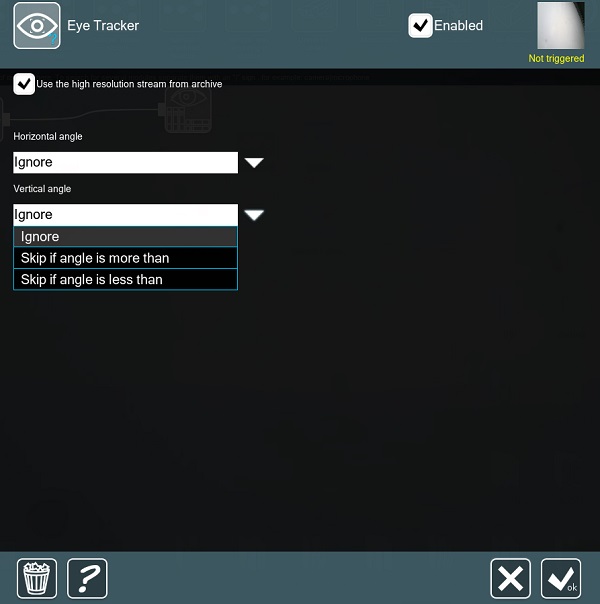
A simple interface and fully automated operation. Add the Eye Tracking module to the chain after the Universal Camera module and choose the right vertical and horizontal angle settings.
After the module, add the filters and reactions you need: an SMS, a sound alarm, HTTP commands to integrate with external services, or your own reaction. Save summary reports, review recordings of the episodes that matter and connect from anywhere.
Quick start
Test it in a few minutes
Download and launch Xeoma in Trial, or activate a Standard or Pro license plus the license for the Eye Tracking module. You can also get a demo license for longer testing.
Let Xeoma find cameras in the network automatically, or add a camera manually by IP address. Any camera types are supported.
Place the module in the camera’s chain after the Universal Camera module.
Click the module in the chain to open its settings. The module needs to download resources from our website to work — wait for the download to finish (when the loading message disappears), then set the vertical and horizontal viewing angles. Define the sector you need, and the module triggers when the gaze leaves it (a student looks away from the monitor during an exam) or, conversely, enters it (a visitor glances at the promo banner to the left of the entrance).
A spreadsheet report, recording to the archive, an email or a messenger message, a sound alarm, network commands or your own reaction — pick the outcome you need from Xeoma’s arsenal.

Try Xeoma for free
Enter your email and name to get a free demo license. No credit card required.
Get free demo licenses to email
Full functionality. Sent instantly.
We urge you to refrain from using emails that contain personal data, and from sending us personal data in any other way. If you still do, by submitting this form, you confirm your consent to the processing of your personal data
Video
See how it works
Also read our PDF presentation on using eye tracking in business and science.
Ecosystem
Related Xeoma tools
Xeoma has other AI-based modules that come in handy in science, research, marketing and security:

Emotion recognition
Reacts to the emotions of people in the frame — helps gauge responses to ads and the quality of service.

Face ID
Keyless automatic access to restricted areas — based on a combination of face and access card.
Coming soon: try on clothes online with no physical contact — saving the shopper’s time.
Over 100 AI-based video analytics features — pick the ones your task needs.
And that’s just a part — explore all of Xeoma’s video analytics.

Not quite right for your task?
If the module doesn’t cover your specific need, we can develop the functionality you want and add it to Xeoma as paid development. Learn more →
Ready to try Xeoma?
Download the free version or get a full-featured demo license — and set up eye tracking in a few minutes.
Latest update: October 23, 2026