
Sports Ball & Players Tracking
AI detection and automatic PTZ tracking that keep the ball or the players in frame throughout a live sports broadcast — on ordinary, off-the-shelf equipment.
What it is
A camera that follows the game

The module works for soccer, basketball and other team games, across a variety of field conditions. It needs no special equipment: ordinary, commonly available off-the-shelf computers and cameras will do. Any camera brand or model that supports standard streaming and PTZ protocols can be used — just make sure the picture is sharp and the fast-moving ball won’t be blurred.
Licensing: Additional module. Purchased separately and activated on top of Xeoma Standard or Xeoma Pro.
Highlights
What makes it stand out

Different team games, one solution
Works with basketball, soccer and hockey out of the box. More sports can be added on request.

Any equipment
As always, Xeoma needs no special equipment or hardware — any off-the-shelf computer and any PTZ camera will do, as long as the ball remains clear and unblurred.

Easy one-click setup
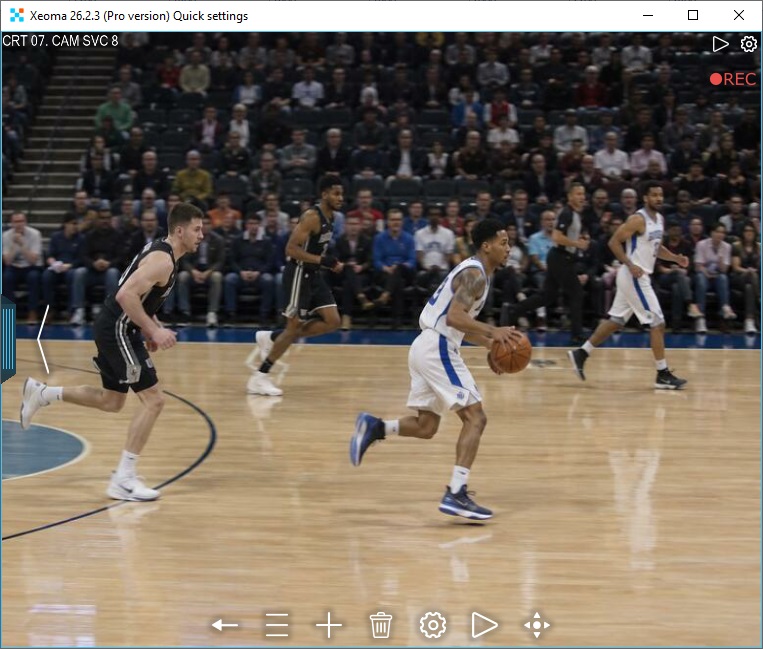
Connect the module to a PTZ camera in Xeoma, let it fetch the resources it needs, and the system is ready to work.
Ease of use
Simple interface, fully automated
A simple interface and fully automated operation: just let Xeoma download the datasets for you, and you’re good to go.
Three types of auto-tracking:
following the ball (available for soccer),
following the group of players (available for basketball, American football, handball, hockey and so on),
or both, with Xeoma automatically switching between them based on its built-in AI logic.

The system can recognize objects at distances of 10, 20, 50 and 100 meters from the camera. Note that the recognized object must be at least 100×100 px in size.
This module is available in Xeoma for 64-bit Windows, Linux, and macOS. It is not available for Linux/ARM or Android. Contact us if you need it for an unsupported operating system.
Quick start
How to test it
Download and launch Xeoma. The program starts in the Trial edition, where almost everything is available. For convenient testing, you can get a demo license.
Let Xeoma find cameras in the network automatically, or add a camera manually by IP address. Any camera types are supported.
Add the module to the camera chain after the “Universal camera” module.
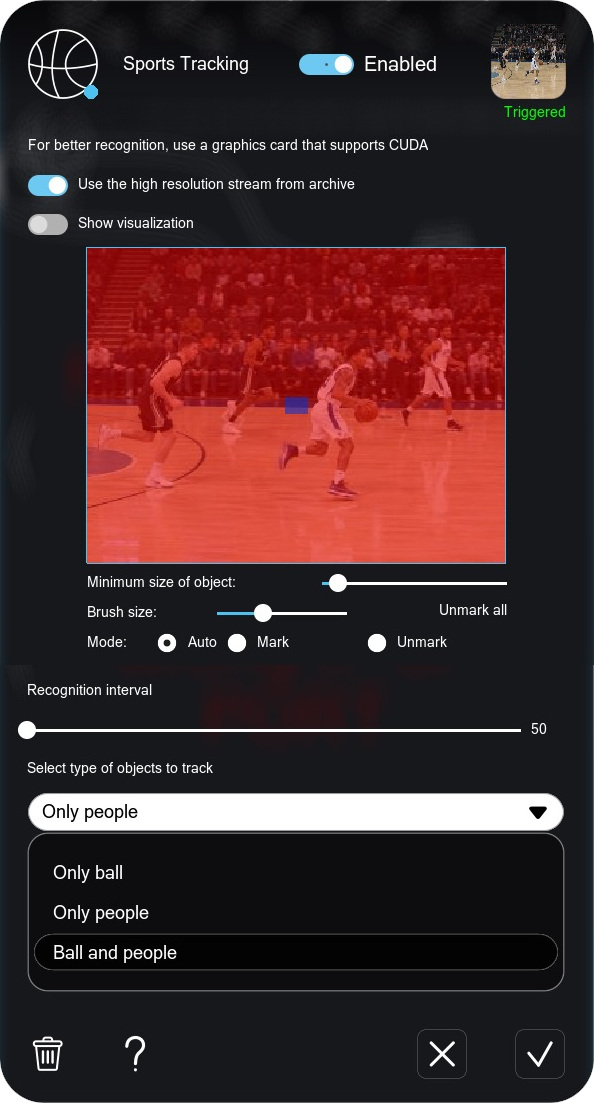
Click on the module in the chain to open its settings. Wait while the module downloads the resources it needs for work, then select the settings tailored to your project: the monitoring zone, selection of what to track: players or the ball, visualization of the objects with a green frame, and the frequency of recognition attempts.
Recording to the archive, a spreadsheet report, email, a sound alarm, your own reactions — choose the result you need from Xeoma’s arsenal.
Try Xeoma for free
Enter your email and name to get a free demo license. No credit card required.
Get free demo licenses to email
Full functionality. Sent instantly.
We urge you to refrain from using emails that contain personal data, and from sending us personal data in any other way. If you still do, by submitting this form, you confirm your consent to the processing of your personal data
Video
Watch Sports Tracking in Xeoma
Need something else?
We can develop the functionality you need and add it into Xeoma as paid development. See details →
Ecosystem
Related Xeoma tools
Xeoma has over 100 modules. These are often used together with Sports Tracking or extend what it can do.

Object Recognition
Detects objects in the frame — a sports ball among them — but, unlike Sports Tracking, it doesn’t turn the camera to follow them.

PTZ Tracking
Simply turns a PTZ camera to follow any moving object in the frame — a general-purpose option when you don’t need sport-specific logic.
QR Code Recognition
Scans entry tickets quickly at the stadium gate and integrates with access control systems.
Face Recognition
Helps spot wanted or banned individuals at the stadium by matching faces against your watch lists.
And that’s just a part of it — see all of Xeoma’s Additional modules.
Ready to automate your broadcasts?
Download Xeoma and run it in Trial mode, or test it with a free demo license — no strings attached. The module sets up in about a minute and tracks the game on its own.
December 10, 2019