
What the Parking Spots module is

A status change triggers any scenario you choose: an email notification, an HTTP command, displaying information on a scoreboard or recording to the archive.
Besides paid parking lots, the module is useful wherever you need to know whether spots are taken: in a cinema, an office, an airport or a bus station. The module can be purchased in addition to a Xeoma Standard or Xeoma Pro license.
Typical uses
The Parking Spots additional module is a way of detecting the required type of objects in the selected zones. Here are just a few application examples.

Parking lots
Detect empty and occupied parking spaces, get notifications and display the information on the scoreboard. Record all data in a CSV report and calculate the cost of parking for each car.

Cinemas
Select the chairs as zones and set the Object Recognizer to react to people. Get information on empty and occupied seats to estimate the popularity of your cinema and certain movies.

Offices
Track the presence of employees in the workplace: select workplaces as zones and configure the Object Recognizer to react to people.

Safe city and police
Detect illegal parking of vehicles in restricted or service areas.

Airports
Automate the detection of free parking areas for aircraft on aprons and in hangars.

Bus stations
Detect free platforms and long-term parking spots for buses at the bus station.
No special equipment required
An ordinary computer
An ordinary modern computer can cope with the load from the module — no expensive server is needed.
Any camera
You can use any camera: no expensive cameras with built-in sensors and artificial intelligence capabilities are required.
Multiple operating systems
Works on Windows, macOS, Linux (including ARM architecture) and Android — and even on Raspberry!
How it works
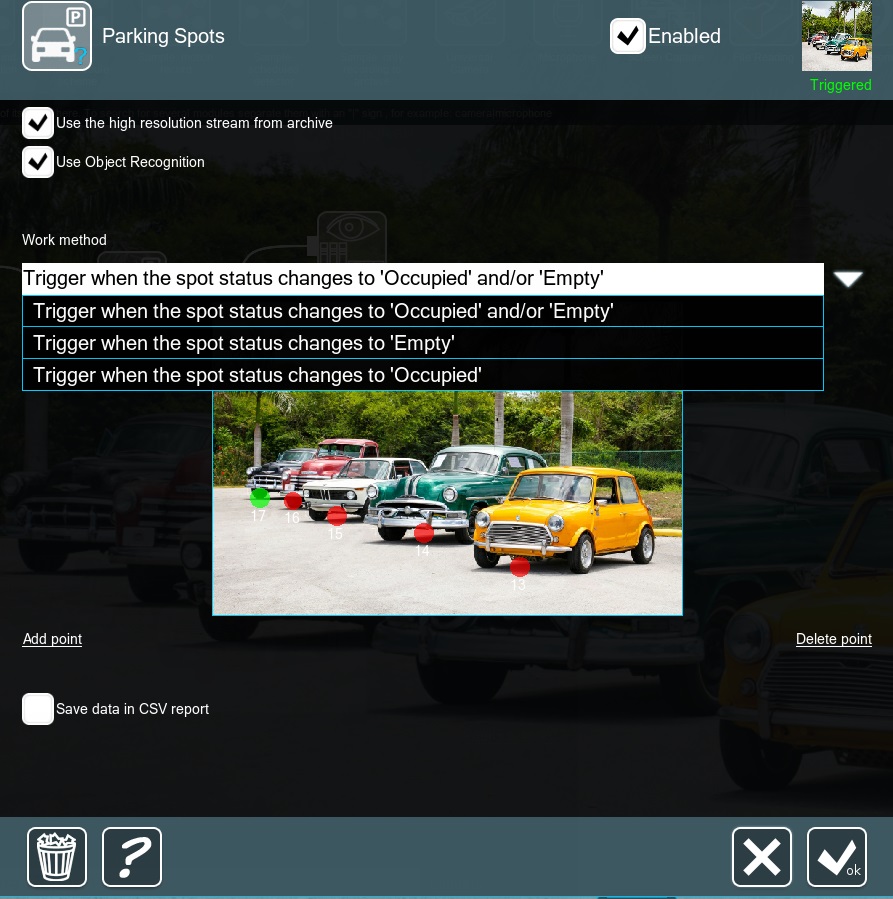
Mark the spots — the module does the rest
Connect the Parking Spots module to the chain and, in its settings, place a point in the center of each parking slot. The module will monitor the appearance of the required type of objects (for example, vehicles) in the parking spots — or its disappearance — and will report the status change right away.
- Triggers only on the selected object type: if another objects type appears in the selected area, the module will not be triggered, which guarantees a high level of accuracy
- Cars are recognized by the module’s own built-in algorithms
- For people, planes or buses, connect the Object Recognizer set for detection of the required type before this module
- For notifications and statistics collection, connect the email notification or sending HTTP commands modules after this module
- Data can be saved to CSV reports

Car recognition is already built in
Starting with Xeoma beta 23.3.22, car recognition algorithms are already built into the Parking Spots module itself, so the additional Object Recognition module is no longer required to detect the spot’s state change caused by cars.
Watch the video about the Parking Spots module in Xeoma
Five simple steps to get the Parking Spots module up and running
Download Xeoma and launch it in the trial edition, or activate a Pro or Standard edition license together with the license for the Parking Spots additional module. You can also get a Xeoma demo license for longer testing.
Add a camera manually or let Xeoma find the cameras in your network automatically. Any camera type is supported.
Skip this step for cars — the Parking Spots module recognizes them itself. To monitor other objects (people, planes, buses), add the Object Recognizer module to the chain and set reactions to the needed objects.
Add the Parking Spots module to the camera’s chain (after the Object Recognizer, if you use it) and place a point in the center of each spot in its settings.
Add the necessary filters and reactions to the chain after the module: email notifications, sending HTTP commands, recording to the archive or your own custom reaction.
demo license
In addition
Besides Parking Spots, these modules are useful for roads and parking lots:
- License plate recognition — detection of cars, trucks and motorcycles entering the parking lot and recognition of their number plates
- Vehicle Speed Detector — finds and identifies offenders of the speed limit in the frame
- Crowd Detector — automatically counts the number of people in the frame using neural network technologies
More details in the user manual.
And that’s just a part — see all video analytics in Xeoma.
Try Xeoma for free
Enter your name and your email to get free demo licenses. No credit card required.
Get licenses to email
Full functionality. Sent instantly.
We urge you to refrain from using emails that contain personal data, and from sending us personal data in any other way. If you still do, by submitting this form, you confirm your consent to processing of your personal data
Do you need something else?
The module does not fit your specific needs? We can develop the needed functionality and add it into Xeoma as the paid development.
Any questions? Assistance required? Reach out to us! We’ll be happy to help!
Read also
Video surveillance for vehicles, cars, parking
How video surveillance is used for vehicles, parking lots and gas stations.
Object Recognizer
How Xeoma tells people, cars, buses, planes and other objects apart.
Camera-Embedded Detector
Using the camera’s built-in analytics together with Xeoma.
Xeoma Cloud
Cloud video surveillance with Xeoma Cloud.
Hardware calculator
Calculate the system requirements for your configuration.
Additional modules in Xeoma
All AI-powered additional modules available in Xeoma.
Ready to start?
Test the Parking Spots module with a free demo license — no credit card and no personal data required. Setup takes just a few minutes.