“Time and Attendance” module in Xeoma
 The «Time and Attendance» module in Xeoma automatically records employees’ arrival and departure times, monitors their presence at their workstations throughout the day, tracks late arrivals and other schedule deviations. The module is based on facial recognition technology. Cameras connected to the system detect an employee’s appearance within the field of view, and the software compares the image with a database and logs the event.
HOW IT WORKS
The time tracking process can be broken down into several stages:
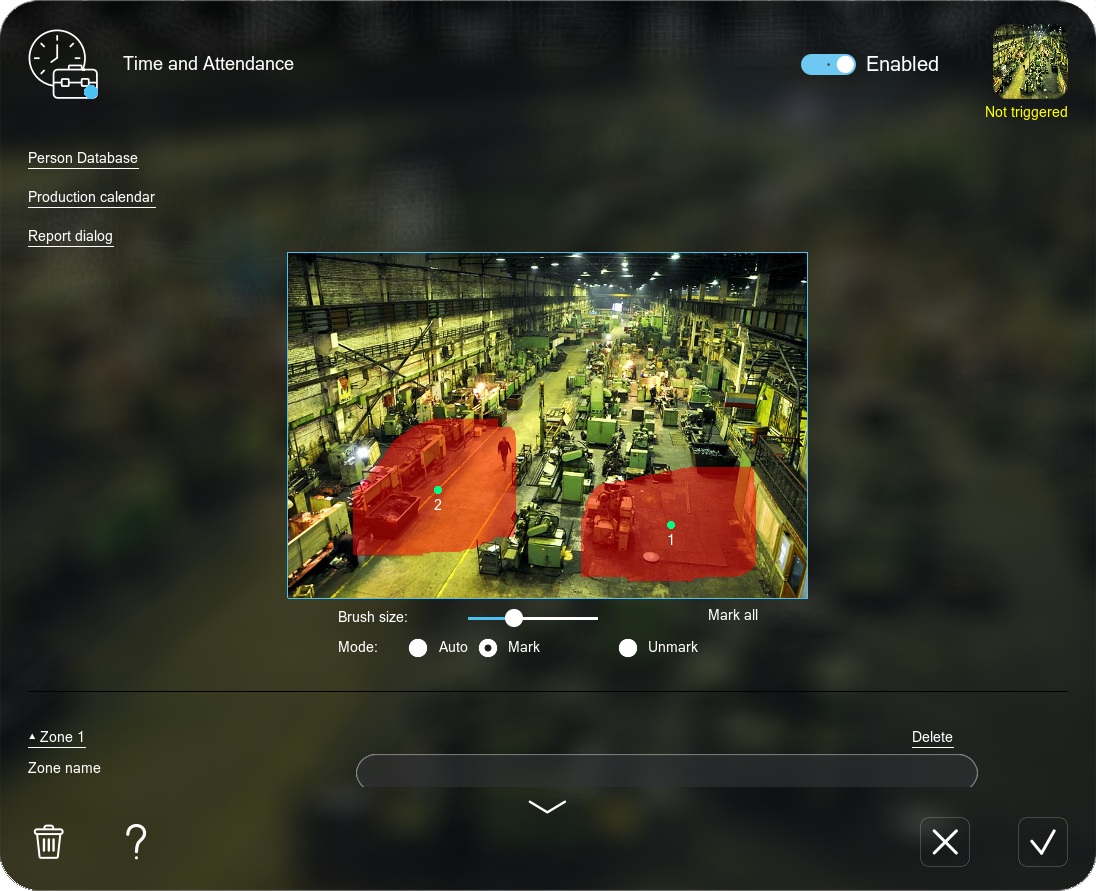
- System setup: First, you need to train the “Face Recognition” module and add employees. Then, in the “Time and Attendance” module settings, define zones, select employees, and configure the work schedule.
- Recognition: When an employee enters the camera’s field of view, the system analyzes the image and attempts to find a match in the database.
- Time recording: If the identity is confirmed, the system records the current time as the moment of arrival, departure, or presence in the selected zone, depending on the specified settings. The data is saved in a log file.
- Log files: Based on the collected data, the module automatically generates reports in .html format. These reports include timesheets, records of late arrivals, and other information.
- Notifications: If needed, the system can be configured to send notifications to the administrator when an employee is late, leaves early, or is absent longer than the allowed time. For this purpose, you can connect one of the notification modules in Xeoma.
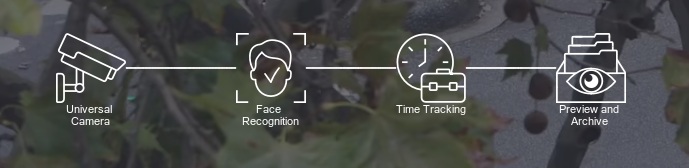
The following chain can be used to operate the module: “Universal Camera” – “Face Recognition” – “Time and Attendance” – “Preview and Archive”
Instructions for setting up the Face Recognition module can be found here.

Advantages
- Elimination of human error: Automation reduces errors associated with manual timesheet entry and lowers administrative costs
- Ease of use: The module requires only a standard camera; no facial recognition terminal or other specialized equipment is required.
- Accounting transparency: All data is recorded objectively, reducing the risk of falsification (unlike traditional methods such as paper logs or access cards).
- Improved discipline: Employees are aware that their attendance is tracked, reducing lateness and early departures.
- Performance analysis: The collected data helps identify workflow inefficiencies (e.g., frequent absences during certain hours).
Where to use?
This module is especially useful for organizations with large staffs and strict discipline requirements:
- production workshops;
- large corporate offices;
- warehouses and logistics centers;
- factories and plants;
- retail chains;
- government agencies.
The “Time and Attendance” module transforms your video surveillance system into a powerful HR management tool. It simplifies personnel record-keeping, improves discipline, and reduces administrative workload. When properly configured, it becomes a valuable investment in business efficiency.
The module is available as an add-on with a separate license.
No special equipment required:
Can be used on a regular computer with virtually any camera.

Flexibility and versatility:
Supports various reactions (including custom programmable ones) and integration with third-party systems.

Real-time operation:
Processes video streams in real time without delays. All processing is performed on your own equipment.

Cost-effective solution:
Licenses can be purchased for the required number of employees and are perpetual.
This module can be easily configured through the interface by specifying the necessary parameters. You can create custom module chains by connecting notifications and reactions within Xeoma.
In the module settings, you can define zones and name them (e.g., workstation, entrance door, etc.), add employees and combine them into groups, configure a work schedule (production calendar) and generate reports (.csv or .html) with detailed data for each employee (late arrivals, time spent in zones, restricted area access, early departures, etc.)
More features:
Xeoma also has other modules and features that will be useful for workplace automation:
- Face ID enables dual authentication and automated access control.
- Visitor Counting works with line crossing or direction detection (entry/exit).
- Search by photo quickly locates individuals in recorded footage.
- Crowd Detector detects crowds in the frame and sends notifications.
Try Xeoma for free! Enter your name and your email to send the license to in the fields below, and click the ‘Get Xeoma free demo licenses to email’ button.
We urge you to refrain from using emails that contain personal data, and from sending us personal data in any other way. If you still do, by submitting this form, you confirm your consent to processing of your personal data

|
Need something else? We can develop what you need and add it to Xeoma using paid development. Details. |
April 27, 2026
Read also:
Face ID – double authentication
Visitor counter
Modules in Xeoma
Module chains in Xeoma
Integration with external devices
Full manual