How to Choose a Video Surveillance Camera
A PRACTICAL GUIDE EVEN FOR COMPLETE BEGINNERS
When choosing something, we often assume that more expensive means better. Is that always true? Of course not. The best choice is always a properly selected product that fits your specific needs — without overpaying for unnecessary features. The same applies to video surveillance: a more expensive option may actually be less suitable for your goals or simply excessive.
In this article, we offer a systematic approach to camera selection — from defining your objectives and calculating focal length to night recording and software integration — helping you choose what truly fits your needs, not what sellers want to promote.
If you would like to explore all camera types — including analog and hybrid solutions — we recommend reading our dedicated article, where we compare all available options and their use cases in detail.
1. What Task Should the Camera Solve?
Before reviewing technical specifications, ask yourself: “What exactly do I need this camera for?”
There are four basic scenarios:
1. Monitoring — simply observing what is happening.
2. Detection — determining whether any object or event is present in the frame.
3. Recognition — identifying the type of object (e.g., animals, motorcycles).
4. Identification — reliably distinguishing specific objects from one another (for example, recognizing individuals).
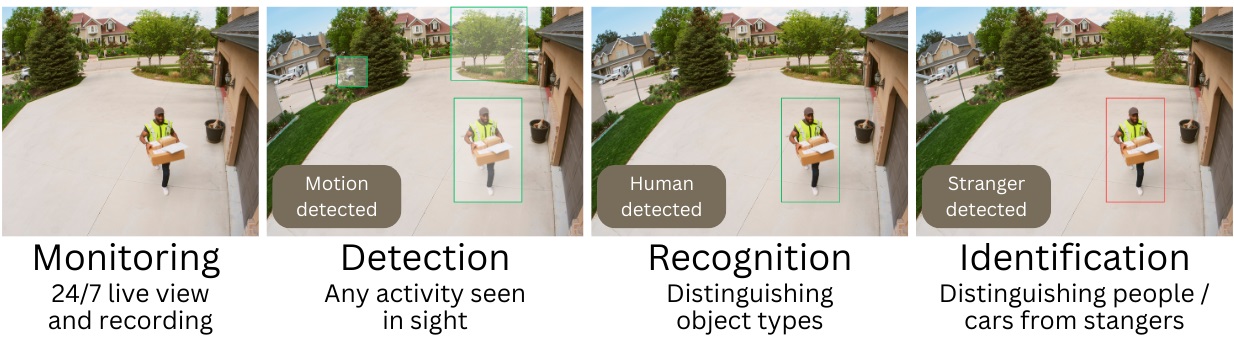
Why does this matter? Because each task requires a different level of detail in the video stream.
For example:
• For general parking lot monitoring, a wide viewing angle with moderate detail may be sufficient. This is more affordable, but it may not allow you to zoom in clearly during incidents or identify individuals.
• For facial recognition at an entrance, a narrowly focused camera with the correct focal length is essential. Higher image quality typically increases the price, but ensures faces are captured clearly enough to serve as reliable evidence.
Once you have defined your task, move on to the next step.
2. Resolution: How Many Megapixels Do You Really Need?
A common mistake is chasing the highest possible resolution.
When lower resolution (1–2 MP) is sufficient:
General monitoring or close-range detection. For example:
• apartment
• office
• small retail store
• kindergarten or school
When medium resolution (2–3 MP) is needed:
Detection of specific objects, behaviors, or events, or recognition at short to medium distances.
• parking lots
• warehouses
• shopping centers
• university campuses
• residential complexes
When higher resolution (4–8 MP) may be required:
Recognition or identification at longer distances.
• industrial facilities
• city surveillance
• areas with many fine details
Resolution alone cannot compensate for incorrect camera placement or unsuitable specifications. For example, license plate recognition requires the camera to face vehicles directly, and people counting requires top-down positioning. If the camera lacks night vision, it will not capture events in darkness — even with ultra-high resolution.
For more technical specifications, see section 6 below.
3. Form Factor
You may notice that cameras differ in appearance. Does shape affect functionality? In short — yes. The form factor determines certain operational characteristics:
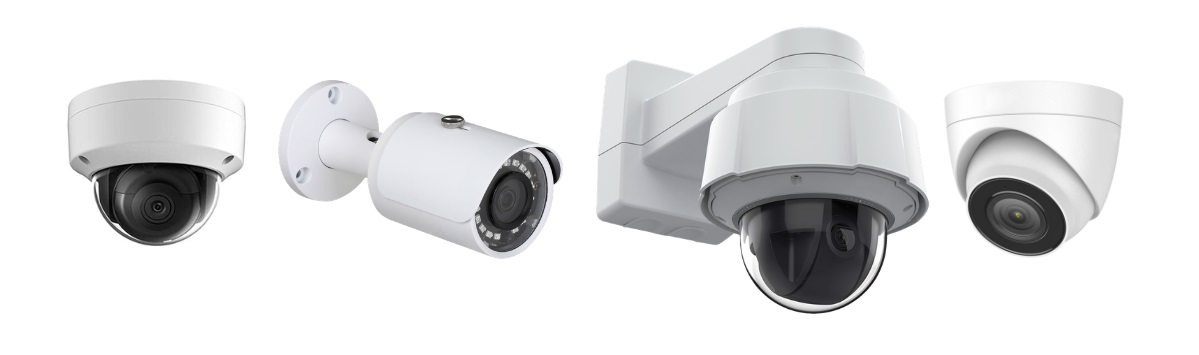
• Dome — compact, direction of view is less obvious
• Bullet — highly visible, strong psychological deterrent effect
• PTZ — remote pan, tilt, and zoom control for large areas and multiple viewing directions
• Turret — combines features of dome and PTZ; no glass dome, but a ball joint that can be manually adjusted
• Desktop / Shelf (also called fixed lens cameras) — no installation required; can be placed on a shelf or windowsill. Some models are cube-shaped. Typically indoor, though rare outdoor models exist.
• Ceiling or Panoramic – cameras with flat or hemispherical bodies equipped with ultra-wide-angle lenses. This allows the camera to cover a full 360° area, eliminating blind spots even when using a single device. An example of such a camera is the Pelco 360 Degree Fisheye Camera.
For indoor surveillance, dome and turret cameras are typically recommended; PTZ models are suitable for large indoor spaces like warehouses or hangars. For outdoor use, bullet and PTZ cameras are more appropriate, as they are optimized for harsher conditions and longer distances.
If the camera is installed outdoors, it should have:
• IP66/IP67 rating (weather resistance)
• specified operating temperature range
• protection against condensation and environmental exposure
4. Sensor and Light Sensitivity
Consider whether recording will take place in low-light conditions. A camera may perform perfectly in daylight but become ineffective at dusk due to image noise. In well-lit offices this is less critical, but for 24/7 outdoor surveillance twilight can be problematic.
Pay attention to:
• sensor size (1/2.8″, 1/1.8″, etc.)
• minimum illumination (Lux)
• WDR support (for challenging lighting conditions)
• type of night illumination (IR / white light)
A larger sensor performs better in low light (less noise) and typically provides a wider field of view.
Lux indicates the minimum light level required to produce a usable image. The lower the Lux value, the better the performance in darkness (e.g., 0.001 Lux is better than 0.1 Lux).
WDR helps balance scenes with strong contrast by brightening shadows and reducing highlights. This technology is common in smartphone cameras.
We discuss illumination types further in section 5.
5. Night Recording: IR or Full-Color?
If night operation is required, there are two main approaches:
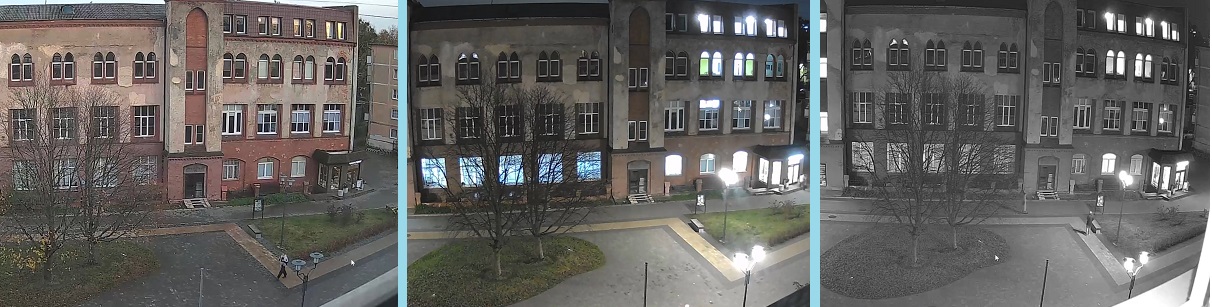
Infrared (IR) illumination — the traditional solution where the camera switches to black-and-white mode at night. No additional equipment is required, making it simple and cost-effective. IR cameras are also less noticeable in darkness.
Full-color night recording — achieved by adding external lighting. Floodlights or other illumination devices allow the camera to operate in near-daylight conditions, improving analytics performance since most algorithms are trained on daytime images.
Although it is rare, some cameras have built-in floodlights – for example, Reolink’s elite floodlight camera series – which is perfect for situations when getting additional lighting equipment is problematic.
The choice depends on your objectives. If color detail is not critical, built-in IR is often sufficient.
6. Focal Length and Field of View
This is a key parameter that determines whether the camera can clearly capture objects at a specific distance.
Simple example:
* 2.8 mm — wide angle, broad coverage, less detail
* 6–12 mm — narrower angle, smaller coverage area, more detail
Although this may sound complex, selecting the correct focal length is straightforward. Use our calculator below.
Focal Length Calculator
To select the optimal camera, consider the focal length — the parameter that determines how clearly objects are captured at a given distance.
Focal Length and Field of View Calculation
Results:
How to use:
Enter the required parameters into the calculator fields. Specify the distance from the camera to the object and the width of the area that must be captured. The calculator will automatically determine the recommended focal length and viewing angle.
The calculation is based on standard geometric optics formulas and helps avoid common mistakes when selecting a camera “by eye.”
Using the calculator significantly reduces the risk of choosing a camera that later fails to provide sufficient detail for recognition or identification tasks.
7. Video Analytics: In the Camera or in Software?
Modern surveillance systems increasingly rely on intelligent analytics: face recognition, license plate recognition, abandoned object detection, people counting, behavior analysis, and more.
There are two possible approaches:
• Built-in analytics inside the camera
• Server-based analytics via video management software
The second option is usually more flexible, more stable, and offers significantly broader capabilities. In many cases, it is the only viable solution for specific tasks. It can be difficult to find a camera that meets the required technical specifications for operation in challenging conditions (for example, extreme weather), not to mention having built-in specialized video analytics — and such cameras are often highly specialized and therefore quite expensive. In such situations, you can select a camera that meets the necessary technical requirements and perform video analytics using dedicated third-party software.
For example, the Xeoma video surveillance software includes more than 30 video analytics modules that are continuously being improved. Naturally, no single camera offers such a comprehensive set of capabilities.

If you plan to expand your system in the future, it is advisable to select cameras that are compatible with professional VMS platforms (see section 8).
8. Network Parameters and Video Stream
Before purchasing, verify the following technical characteristics:
• RTSP support
• ONVIF compatibility
• Supported codecs (H.264 / H.265)
• Adjustable bitrate
• Stable firmware and manufacturer updates
These parameters determine how easily the camera integrates into your existing infrastructure and how efficiently it uses network bandwidth and storage.
9. Common Mistakes When Choosing a Camera
1. Selecting too wide a viewing angle for identification tasks
2. Ignoring focal length calculation
3. Overestimating the importance of megapixels
4. Failing to consider lighting conditions
5. Not planning for future system expansion
The right camera is not the most expensive one — it is the one that solves your specific task efficiently and reliably.
Define your objective, calculate the focal length, assess lighting conditions, and ensure compatibility with your software. A systematic approach will save both budget and time.
If you would like to test modern video analytics capabilities before purchasing equipment, consider trying professional video surveillance software in demo mode to better understand which features are truly relevant for your facility.
Try Xeoma for free! Enter your name and your email to send the license to in the fields below, and click the ‘Get Xeoma free demo licenses to email’ button.
We urge you to refrain from using emails that contain personal data, and from sending us personal data in any other way. If you still do, by submitting this form, you confirm your consent to processing of your personal data
February 13, 2026
See also: More articles from Xeoma