What is Xeoma’s module?
If your acquaintance with Xeoma Video Surveillance Software has only started, you probably wonder what a Xeoma’s module is. This article will help you learn about modules and their key role in the software.
Xeoma’s modules are functional blocks, that, when combined, are used to build chains or combinations of modules. Simply put, a module is a certain feature represented by an icon. Modules differ in their functions.

Modules are combined in groups based on their common features. There are 5 groups of modules in Xeoma.
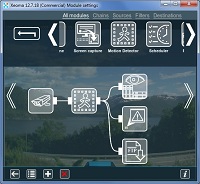
All modules is a default group. It shows all the modules in IP cam software Xeoma.
If you press Chains, you will see the list of ready-to-use chains consisting of several modules. You don’t have to spend time combining modules into chains – use ready-to-use chains instead.
Devices is a group of modules handling signal sources. It includes camera, microphone, file reading and another Xeoma modules.
Destinations (or reactions) are modules used to specify an action as a reaction to an event: e-mail notification, saving to file, preview, preview and archive, sound alarm and application runner.
Filters is a group of modules that do actually filter the signal thus setting the following modules to work or not. Such filters are scheduler, motion and day detectors.
You have decided to give Xeoma a try and want to know what edition of functioning is best for you? Xeoma can work in three editions: free, trial and standard.
Xeoma licenses can be purchased here.
You decided to try Xeoma video surveillance software and want to know which mode is right for you? Please use our questionnaire – it will help you choose the suitable Xeoma mode in one minute!
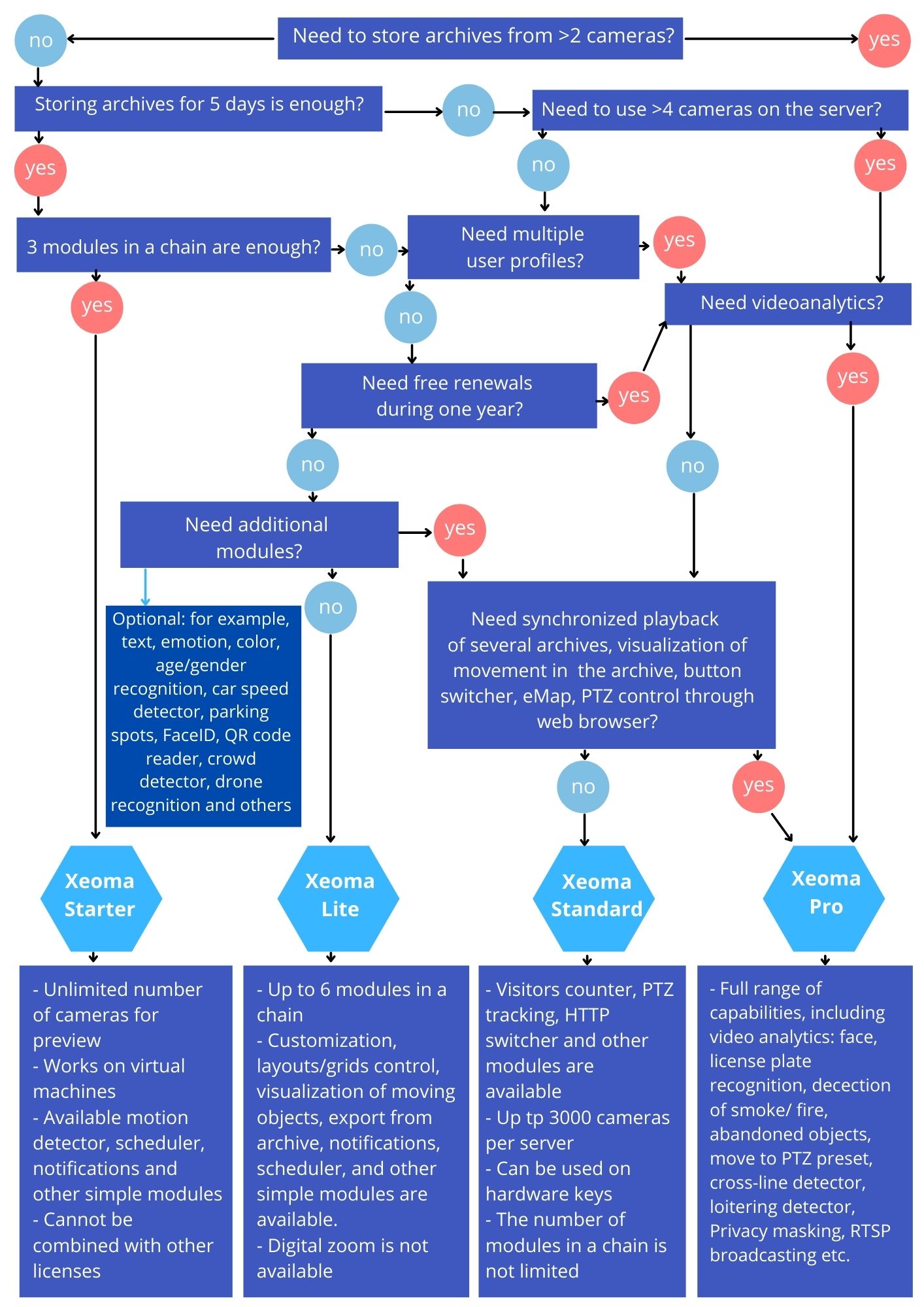
Still do not know which edition fits you? Feel free to ask us or request a demo license for tests
The table below will show all differences between Xeoma editions in details and will help you choose one for you:
Comparison table for Xeoma video surveillance software editions:
| Trial | Free | Starter | Lite | Standard | Pro | |
|
Most important features |
||||||
| Maximum number of available sources | Unlimited | Unlimited | Unlimited (2 for an Archive) | 4 | Unlimited (depend on license type) | Unlimited (depend on license type) |
| Maximum number of modules in chain | Unlimited | 3 | 3 | 6 | Unlimited (depend on license type) | Unlimited (depend on license type) |
| Live view | Yes | Yes | Yes | Yes | Yes | Yes |
| Saving recordings to Archive | Yes | Yes | Yes | Yes | Yes | Yes |
| Archive retention period before overwriting | 1 hour | 5 days | 5 days | Unlimited | Unlimited | Unlimited |
| Remote access | Yes | No | Yes | Yes | Yes | Yes |
| Multiple user profiles available | Yes | No | No | No | Yes | Yes |
| Able to work in shellless (no-GUI) OS | Yes | No | Yes | Yes | Yes | Yes |
| Possibility to use Repeater* | Yes | Yes | Yes | Yes | Yes | Yes |
| Time of work | 8 hours since launch, then custom settings are reset | Unlimited | Unlimited | Unlimited | Unlimited | Unlimited |
| Can be used with Additional modules (bought separately) |
Yes (trial time) |
– | – | – | Yes | Yes |
| Watermark Free | Yes | – | Yes | Yes | Yes | Yes |
| Updates to new versions of Xeoma | Yes | Yes | No | No | Yes (1 year since purchase date)
extend the free updates period with up to 80% discount |
Yes (1 year since purchase date)
extend the free updates period with up to 80% discount |
| Customization | Yes | No | Yes | Yes | Yes | Yes |
| Other key features |
free of charge
settings are restored to defaults every 8 hours/at program exit all features available for test (except for settings backup and Additional ANPR) |
free of charge
maximum 4 Preview and Archive modules, maximum 4 Sending Email modules user profiles available for access on the same computer unlimited time of work with free updates of the program |
paid mode (requires a license)
Unlimited number of cameras for a preview maximum 2 Preview and Archive modules, maximum 2 Sending Email modules Only administrator’s profile for the Remote access |
paid mode (requires a license)
limited number of available modules |
paid mode (requires a license)
Standard licenses cumulate with Pro all regular modules available |
paid mode (requires a license)
Pro licenses cumulate with Standard regular + special PRO modules available |
|
Work with cameras |
||||||
| View of cameras in real-time via Client | Yes | Yes | Yes | Yes | Yes | Yes |
| Camera view in web browser (Web server module) | Yes, 1 camera | No | Yes | Yes | Yes | Yes |
| Change of settings in web browser | Yes | No | No | Yes | Yes | Yes |
| PTZ control | Yes | – | – | Yes | Yes | Yes |
| PTZ control through web browser | Yes | – | – | – | – | Yes |
| Digital zoom | Yes | – | – | – | Yes | Yes |
| PTZ Tracking | Yes | – | – | – | Yes | Yes |
| PTZ presets and guard tours | Yes, only for ONVIF | – | – | – | – | Yes, only for ONVIF |
| Additional camera functions (focus, washer, etc.) | Yes, only for ONVIF | – | – | Yes, only for ONVIF | Yes, only for ONVIF | Yes, only for ONVIF |
| Fisheye Dewarping | Yes | – | – | – | Yes | Yes |
| Device List | Yes | Yes | Yes | – | Yes | Yes |
| Interactive maps eMap | Yes | – | – | – | – | Yes |
| Visualization of movement – preview | Yes | Yes | Yes | Yes | Yes | Yes |
| Various layouts | Yes | – | – | Yes | Yes | Yes |
| Fullscreen mode | Yes | – | – | Yes | Yes | Yes |
|
Work with recordings |
||||||
| Search through recordings for motion events by date/date | Yes | Yes | Yes | Yes | Yes | Yes |
| Search through recordings for motion events in a certain area | Yes | – | – | – | Yes | Yes |
| Synchronized playback of several archives | Yes | – | – | – | – | Yes |
| Synchronization with camera’s SD card | Yes | No | No | No | No | Yes |
| Visualization of movement – archive | Yes | – | – | – | – | Yes |
| Possibility to delete pieces of archive | Yes | Yes | Yes | Yes | Yes | Yes |
| Possibility to make intervals of archive undeletable | Yes | – | – | – | – | Yes |
|
Availability of modules |
||||||
| Quick turning off/on of the cameras | Yes | Yes | Yes | Yes | Yes | Yes |
| ANPR: license plate recognition | Yes | – | – | – | – | Yes |
| Button Switcher | Yes | – | – | – | – | Yes |
| HTTP Switcher | Yes | – | – | – | Yes | Yes |
| Visitors Counter | Yes | – | – | – | Yes | Yes |
| Cross-Line Detector | Yes | – | – | – | – | Yes |
| Loitering Detector | Yes | – | – | – | – | Yes |
| Face Detector | Yes | – | – | – | – | Yes |
| Face Recognition | Yes | – | – | – | – | Yes |
| Privacy Masking | Yes | – | – | – | – | Yes |
| Motion Detector | Yes | Yes | Yes | Yes | Yes | Yes |
| Sound Detector | Yes | – | – | – | Yes | Yes |
| Smoke Detector | Yes | – | – | – | – | Yes |
| Fire Detector | Yes | – | – | – | – | Yes |
| Detector of Abandoned Objects | Yes | – | – | – | – | Yes |
| Problems Detector | Yes | – | – | – | Yes | Yes |
| Object Detector | Yes | – | – | – | Yes | Yes |
| Camera Embedded Detector | Yes | – | – | – | Yes | Yes |
| GPIO | Yes | – | – | – | Yes | Yes |
| Image Rotate | Yes | Yes | Yes | Yes | Yes | Yes |
| Image Resize | Yes | – | – | – | Yes | Yes |
| Picture in Picture | Yes | – | – | Yes | Yes | Yes |
| Unitor | Yes | Yes | Yes | Yes | Yes | Yes |
| SMS Sending | Yes | – | – | – | Yes | Yes |
| RTSP Broadcasting | Yes | – | – | – | – | Yes |
| Streaming to Youtube | Yes | – | – | – | Yes | Yes |
| FTP Upload | Yes | – | – | – | Yes | Yes |
| FTP Receiver | Yes | Yes | Yes | Yes | Yes | Yes |
| ANPR Sender to FTP | Yes | – | – | – | – | Yes |
| Senstar PTZ tracking | Yes | – | – | – | – | Yes |
| Move to PTZ preset | Yes | – | – | – | – | Yes |
| Telegram Bot notifications | Yes | – | – | – | – | Yes |
| Saving screenshot (preview, archive) | Yes | – | – | – | Yes | Yes |
| Sound alarm – client | Yes | – | – | – | – | Yes |
| Sound alarm – server | Yes | Yes | Yes | Yes | Yes | Yes |
| HTTP Marking | Yes | – | – | – | Yes | Yes |
| Application Runner | Yes | – | – | – | Yes | Yes |
| Sending Email | Yes | Yes | Yes | Yes | Yes | Yes |
| Relay Switch | Yes | – | – | – | Yes | Yes |
| HTTP Receiver | Yes | – | – | – | Yes | Yes |
| HTTP Upload to other Xeoma | Yes | Yes | Yes | Yes | Yes | Yes |
| HTTP Request Sender | Yes | – | – | – | Yes | Yes |
| Condition | Yes | – | – | – | Yes | Yes |
| Mobile Notifications | Yes | – | – | – | Yes | Yes |
| Save to File | Yes | Yes | Yes | Yes | Yes | Yes |
|
Activation, interface |
||||||
| Client parts update automatically | Yes | – | – | – | – | Yes |
| LDAP synchronization | Yes | – | – | – | – | Yes |
| Activation on virtual machines, including Docker | – | – | Yes, since version 20.10.22. Details here | Yes, since version 20.10.13. Details here | Yes, details here | Yes, details here |
*Repeater is an optional service, bought separately for additional price and compatible with any Xeoma edition.
Details:
First of all you are advised to try Xeoma in one of the free of charge modes – free or trial.
The free edition is basic. In this edition you can use unlimited number of video sources for online view with max 4 cameras that can use the “Preview and Archive” module and max 4 cameras that can use the “Email Sending” module. 1 Source module and max 3 modules from the list of ones available in the Free mode per chain. That said, with the free edition you can build chains that look like:
Just one Video Source or
Video Source + Any other module (except video sources) or
Video Source + Any other module (except video sources) + Any other module (except video sources).
Example:
Camera + Motion Detector + Email Sending
or
Screen Capture + Microphone + Preview and Archive
Max 4 cameras can have the “Preview and Archive” module, and max 4 cameras can have the “Email Sending” module.
Another example:
Camera + Preview
or
Screen Capture + Microphone + Sending to another Xeoma
You can have unlimited number of such cameras per server in the Free mode.
If the server part of Xeoma is in the free edition, it cannot be connected to remotely from a client. But, on the contrary, free edition can be used to connect to Xeoma server either in trial or commercial editions. For more information on Xeoma architecture, please refer to our article Client-Server Architecture of Xeoma.
Use the trial edition of Xeoma to test all modules, including PRO, and find it out for how many cameras you need a license. In trial edition you can use unlimited quantity of modules of any type in any combination during unlimited period of time (your settings will be reset to defaults at program exit and every 8 hours of continuous use) and besides feel the ease and flexibility of Xeoma’s remote access feature.
If you have already tried Xeoma and realized that you needed more than 3 modules and more than 2 video sources to build chains with, you should choose one of the commercial modes: Xeoma Pro, Xeoma Standard, Xeoma Lite or Xeoma Starter edition. You will need a license to switch Xeoma into either of these editions.
When you buy a license, you pay for the number of cameras or other sources that you will be able to use in your Xeoma. With this license-limited number of cameras you will be able to build chains of certain length, complexity, configuration, and containing modules of the type that the conditions for the mode allow. For more information, please refer to the comparison table above or to pages dedicated to the selected mode.
Variety of modes will help you make sure you get to what you need make your system perfect, without paying for what you don’t need. For example, Xeoma Lite is a simplified version of the Xeoma video surveillance program. Xeoma Lite includes the most essential and easy to use modules. In this edition you can use up to 4 video sources and up to 6 of available modules per chain in any combination.
What license do I need to buy?
Xeoma licenses can be purchased here.
See also: a chart to select Xeoma edition
You have tried the trial edition of Xeoma video surveillance software and decided to buy a license. Now you have the question, ‘How many licenses and for how many cameras will I need?’
It’s all simple.
Number of sources you need license for depends on how many IP cameras, USB cameras, source modules you are going to use. Let’s assume you have 8 cams. 6 of them are IP cams (one of them has embedded microphone) and 2 USB cams. In addition, you’d like to use screen capture module. In our example, total number of video sources is 9 (microphone doesn’t count as a video source). You will need to buy a license or licenses just for 9 cameras (video sources).
Number of licenses depends on how many computers you are going to use them on. Since licenses for more sources give you a discount, it’s natural that you might want to buy just 1 license for the total number of video sources you are going to use. But please be careful: while IP cameras can be accessed from several computers in network, and shifted if necessary, embedded USB cams can’t, so every embedded USB cam means using a separate computer, and therefore a separate server, since licenses can be used on 1 machine only, and servers is what you buy licenses for. Another thing to keep in mind here is that client parts (as many as you want) connect to server for free. For more information about server-client connection, you might find our article “Architecture of Xeoma” useful.
If you need to extend the system by adding more sources of video, you can buy additional licenses at any time and add them up to the existing one – licenses summarize.
Modules are a key part of Xeoma video surveillance software that are as important as easy to use. If you have suggestions or inquiries as what functionality should be added please let us know. We value your feedback and opinion.
5 Mar 2012, last updated 6 Nov 2015
Read also:
Complete Xeoma User Manual
Additional modules in Xeoma